What happened
Microsoft is removing the Copilot key from Windows 11 keyboards starting with builds in the Windows Insider Program's Experimental Channel as of January 2025. The key, which launched in 2024, is being replaced with customizable options that let users assign it to other functions or select "Do nothing."
Why it matters
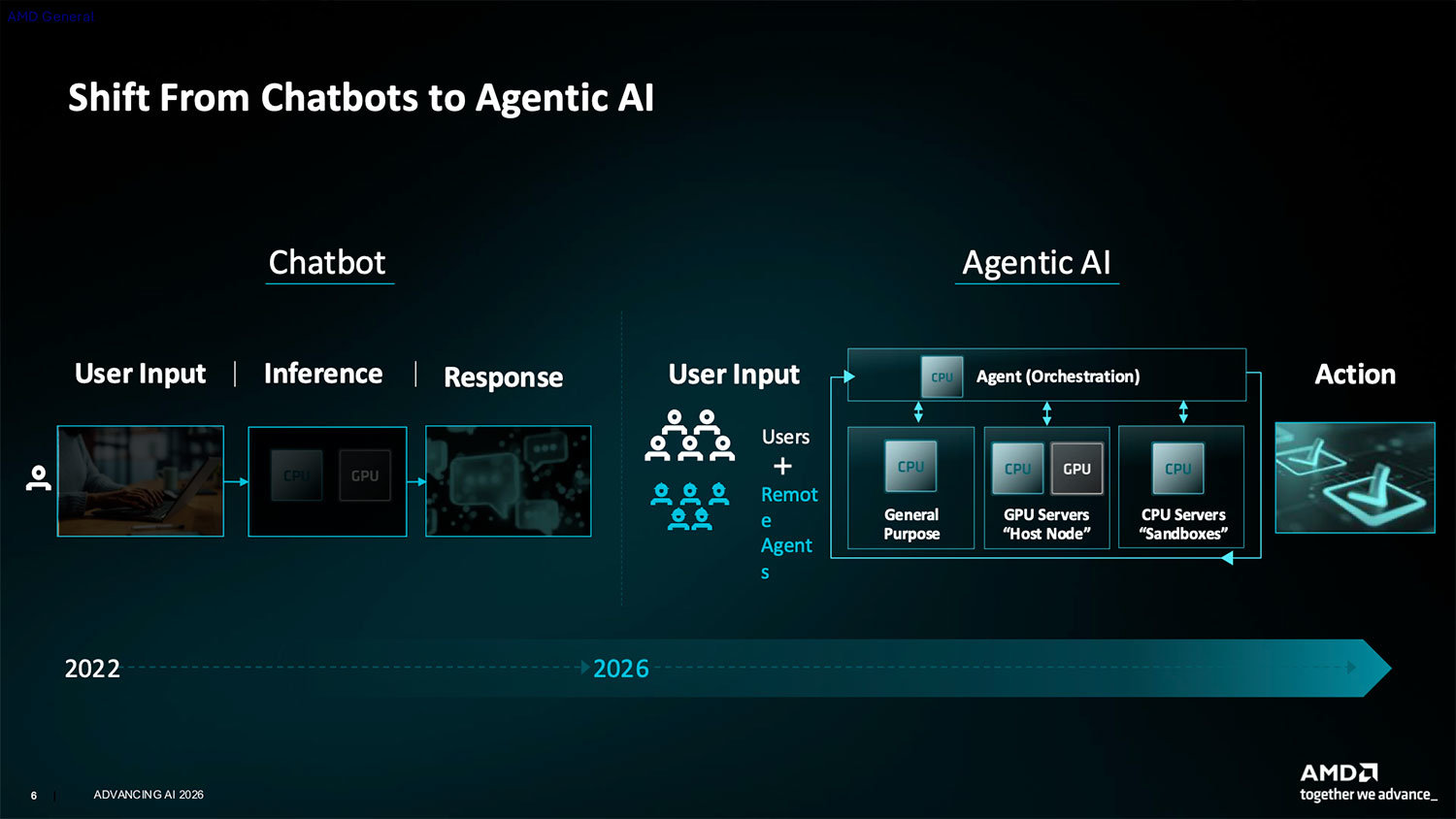
The Copilot key was positioned as a major hardware innovation when Microsoft introduced it two years ago, with PC makers asked where it should be placed. Its quick removal signals that the chatbot-focused interface did not meet user expectations—many preferred existing shortcuts like Ctrl key or function keys. The shift reflects Microsoft's broader move from chatbot to AI agent technology.
What to watch
The change will roll out in Windows 11 updates slated for the second half of 2026. Users will gain the ability to remap or disable the Copilot key entirely, and the physical key removal from keyboards suggests manufacturers are already adjusting their product lines in response.
Summaries like this, in your inbox every morning.
When Microsoft announced the Copilot key in 2024, it represented a bold bet that dedicating a physical keyboard button to AI would become as essential as the Windows key itself. PC manufacturers were asked to design around it, signaling confidence in the feature's importance. However, the rapid pivot to customization and removal in 2025–2026 reveals a significant miscalculation about user behavior and preference.
The article notes that many users already rely on alternative shortcuts—Ctrl key combinations, function keys, or accessibility features—to access the tools they need. Adding a new dedicated key created friction rather than convenience, especially for users with established workflows. The fact that Microsoft is now offering a "Do nothing" option underscores this reality: the company is essentially admitting that for a substantial segment of users, the Copilot key adds no value and may even waste physical keyboard real estate.
This shift also reflects Microsoft's evolving vision of AI interaction. The move from a chatbot-focused interface (the Copilot chatbot) to AI agents suggests the company recognizes that users do not want a standalone conversational tool triggered by a single key. Instead, AI should integrate into existing workflows and applications. The Copilot key, by contrast, was designed to interrupt and demand attention—a design philosophy that appears to have not resonated with the market.
Pick your industry and the AI tools you use, and get news related to your work every day.
Free · 30 seconds with Google · unsubscribe anytimeWhat is AIToday? →
Ask AI anything about this article. The AI reads this article, earlier AIToday articles, and Wikipedia, and cites its sources. Q&As are published on this page for other readers too.
Researchers at Microsoft published a paper titled "Adoption and Impact of Command-Line AI Coding Agents: A Stu…
Meta released open weights for Muse Spark Open, an 816B-parameter model built for coding and long-running agen…

In a Zenn article, EC自動化工房 laid out a pre-generation cleanup step for product masters, adding notation rules t…

Three one-line requests and three requests with written completion criteria to Claude Code produced functional…
Kamei detects confidential and identifying information in text or code, swaps it for pseudonyms that keep thei…
Anthropic built Scion, a centralized source-control system for always-connected coding agents, with a seven-pe…

