What happened
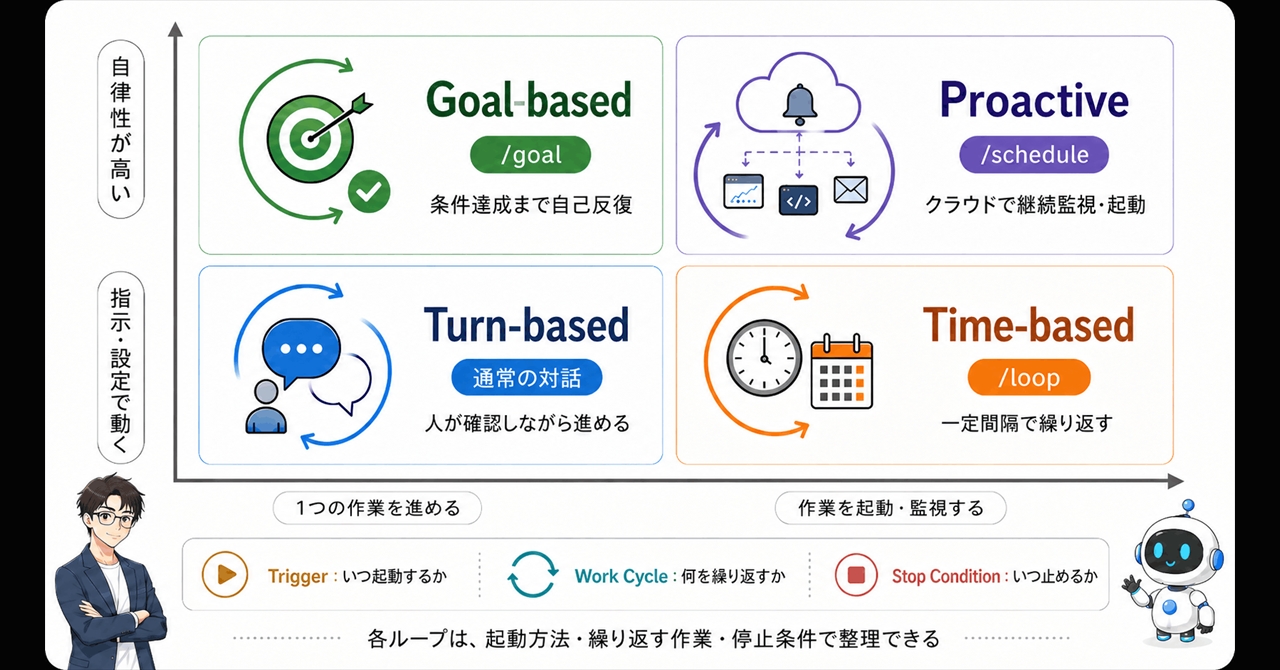
Anthropic published a guide titled "Getting started with loops" on June 30, 2026, explaining how Claude Code's loop feature works across four distinct patterns: turn-based, goal-based, time-based, and proactive loops. The guide organizes each loop by what triggers it, when it stops, what primitive it uses, and what comes after.
Why it matters
AI agents often get stuck repeating tasks without clear stopping points. By naming and contrasting these four loop types, Anthropic helps developers and AI teams design more predictable automation—each pattern suits different workflows (e.g., turn-based for human-driven feedback, goal-based for autonomous targets, time-based for scheduled checks, proactive for human-directed agent behavior). This clarity reduces confusion about when and how to apply loops in Claude Code.
What to watch
The guide emphasizes the difference between /loop (local, runs on your PC) and /schedule (cloud-based, runs as a background service). Developers can also use "Routines" in Claude Desktop to automate loop execution. The distinction between these two command types and the proactive loop design may help teams avoid costly repeated token consumption and better manage agent workload.
Summaries like this, in your inbox every morning.
Anthropic's guide addresses a practical pain point in AI agent design: loops are powerful but easy to misuse. The body notes that prior guides referred to loops generically as "recursive loops" or "agent loops," leaving developers uncertain about which pattern fit their use case. By dividing loops into four named, structured types—each defined by trigger, stop condition, primitive, and sequel—Anthropic has made the feature more teachable and less error-prone.
The distinction between turn-based and goal-based loops is particularly significant: turn-based loops depend on human feedback at each step, while goal-based loops allow the agent to decide when to stop once a target is met. Time-based loops introduce a temporal constraint, and proactive loops grant the human control over start/stop without requiring a schedule or goal. This taxonomy helps developers match their automation intent to the right tool, reducing cases where an agent runs amok or consumes unexpected resources.
The guide's emphasis on /loop (local, synchronous) versus /schedule (cloud, asynchronous) further clarifies deployment trade-offs. For teams using Claude Code, this structural clarity may lower the barrier to confidently building multi-turn agent workflows. The mention of Routines in Claude Desktop suggests Anthropic is also making loop automation accessible via UI, not just CLI commands, though the guide centers on command-line usage.
Pick your industry and the AI tools you use, and get news related to your work every day.
Free · 30 seconds with Google · unsubscribe anytimeWhat is AIToday? →
Ask AI anything about this article. The AI reads this article, earlier AIToday articles, and Wikipedia, and cites its sources. Q&As are published on this page for other readers too.
Chunghwa Telecom president Rong-shy Lin said the shift from conversational AI to autonomous AI agents is resha…
CoreWeave fell 5% in premarket trading Friday and was on track to finish the week down 15%, after rebounding f…
Apple and Meta said they would jointly release a new open-weight AI model designed to run on high-end Macs, ai…
Investors put $38.5 billion into Asian startups in Q3, per Crunchbase data

A writer and entrepreneur opened his daily to-do list and found 156 items, and concluded that an AI assistant…

A longtime Anthropic investor told Fortune he expects shares priced around $1.8 trillion, below the company's…