AIToday
Robotics & Automation NewsPublished: Aug 11, 2026, 22:00 JST4 min read

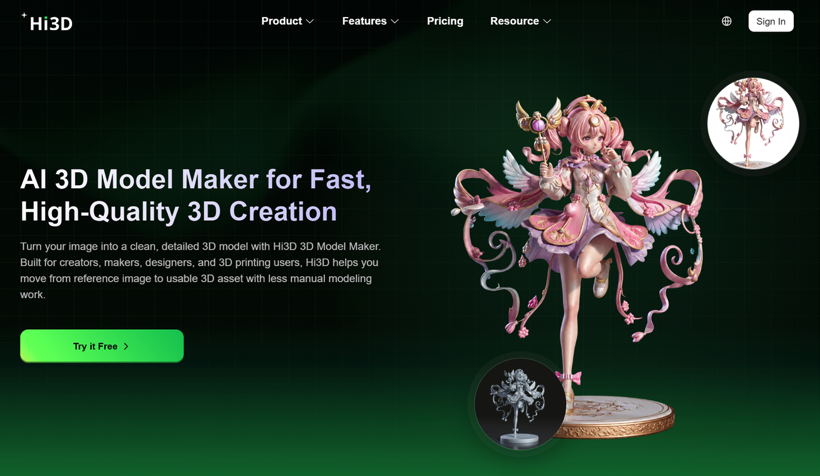
Hi3D turns 2D images and text into printable 3D objects in one workflow

Hi3D turns 2D images and text into printable 3D objects in one workflow

Key takeaway

  • Hi3D, a 3D creation platform, is celebrating its first anniversary with a limited-time promotion of up to 70% off.

  • Unlike most AI 3D tools that only generate digital models, Hi3D combines image-to-3D and text-to-3D generation with practical printing features—including automatic model splitting, texture enhancement, multi-color printing support, and smart layout optimization—designed to guide creators from initial concept through final print-ready file in a single workflow.

  • This end-to-end approach distinguishes it from competitors like Meshy and Tripo, which primarily focus on model generation alone.

3 Key Points

  1. What happened

    Hi3D, a 3D creation platform, is marking its first anniversary with a limited-time promotion offering up to 70% off. The platform combines AI-assisted model generation from images or text, texture enhancement, and printing preparation tools—including features like automatic model splitting, multi-color printing support, and smart arrangement—to guide users from creative concept to a ready-to-print file.

  2. Why it matters

    Most AI 3D tools generate digital models but leave users to handle the difficult steps of refinement and preparation on their own. Hi3D's focus on the complete workflow—creation through printing optimization—cuts out the need to jump between separate software tools, making 3D printing accessible to beginners who find traditional modeling software overwhelming and saving experienced makers time on repetitive file preparation steps.

  3. What to watch

    Hi3D is emphasizing its differentiation from competitors like Meshy and Tripo by positioning itself not as a model generator alone but as an end-to-end solution. The platform's ability to automatically split large models into printable parts, generate assembly connectors, and convert textured designs into multi-color printable formats suggests the competitive bar for AI 3D tools may be shifting from "can it generate a model?" to "can it get you to a finished print?"

In Depth

Read the full story

Hi3D has positioned itself as a bridge between AI-assisted creativity and practical 3D printing production. The platform addresses a well-documented pain point in the creator community: while modern AI tools can generate 3D models quickly, transforming those models into objects ready for physical printing remains a manual, time-consuming process requiring multiple software tools and technical knowledge.

The platform's core features span the entire workflow. On the creation side, Hi3D accepts images or text descriptions as input. Image-to-3D conversion allows users to upload visual references—character designs, product concepts, or photographs—and generate 3D models without manual sculpting. Text-based creation enables users to describe an object and receive an initial model, supporting faster ideation and concept exploration. Once a model is generated, AI-assisted texture creation adds surface detail and color information, addressing the reality that visual quality depends on more than geometry alone.

Where Hi3D diverges most sharply from competitors is in printing preparation. The Split-for-Printing feature automatically divides large or complex models into separately printable components, categorizing parts logically (for character models: head, torso, arms, legs, accessories, base). This eliminates the need for users to manually divide files in professional modeling software. The platform then supports automatic connector generation—creating assembly structures with adjustable size, direction, and placement—so printed parts can be reliably joined after production. Multi-Color Printing support converts textured models into printable color regions, matches colors to available filaments, reduces color fragmentation, and exports 3MF files compatible with slicing software. Smart Arrangement suggests printing orientations, automatically arranges parts on the build plate, and bundles slicer settings into 3MF files, further shortening the gap between digital design and printer input.

Hi3D's differentiation hinges on the completeness of this pipeline. Competitors like Meshy and Tripo excel at model generation but generally release users to external tools for preparation. Hi3D's philosophy—stated explicitly in the article—is that a successful AI 3D platform must "help users continue toward the final physical result" rather than stopping after model production. This reflects a shift in user expectations: as 3D printing hardware becomes cheaper and more accessible, bottlenecks are moving upstream from printer capability to software workflow efficiency. To celebrate its first anniversary, Hi3D is offering up to 70% off, positioning itself as an opportunity for both new users beginning their first 3D printing projects and experienced makers seeking a more efficient preparation pipeline.

Context & Analysis

The 3D printing industry has historically required multiple skill sets and tool switches: 3D modeling expertise to create geometry, texturing knowledge to add details, and file preparation experience to optimize for printing. Hi3D's design addresses a real friction point in the creator pipeline—not the absence of 3D modeling capability, but the fragmentation of the workflow. The platform's emphasis on a complete journey from inspiration to print-ready output signals a shift in how AI 3D tools are being positioned: rather than replacing traditional modeling software (which many power users prefer for flexibility), Hi3D targets the broader audience of creators who want to iterate on ideas without learning multiple specialized applications.

The comparison to Meshy and Tripo is instructive. Both are established AI 3D platforms that have democratized model generation. However, their positioning focuses on the creative moment—the instant when an image or text becomes a 3D shape. Hi3D's explicit inclusion of printing-adjacent features like automatic splitting, connector generation, and multi-color preparation suggests the next competitive frontier for AI-assisted 3D tools is reducing the time and friction between "I have an idea" and "I can hand this to a printer." For users already invested in 3D printing hardware but frustrated by the software pipeline, this integration may be more valuable than a marginally better model generator.

FAQ

What input methods does Hi3D support for creating 3D models?
Hi3D allows users to create models from images (turning visual references into 3D creations) or from text-based descriptions (allowing users to generate models from written concepts without needing a drawing or reference image first).
How does Hi3D help with printing large or complex models?
Hi3D's Split-for-Printing feature automatically divides large models into printable components (such as head, torso, arms, legs, accessories, and base for character models) and can generate assembly connectors to help users connect the printed parts after production.
What makes Hi3D different from other AI 3D tools like Meshy and Tripo?
While tools like Meshy and Tripo focus mainly on generating digital models, Hi3D combines creation with preparation and printing features—including texture generation, multi-color printing support, model splitting, and smart arrangement—creating a complete workflow from idea to print-ready file rather than stopping after model generation.
Robotics & Automation NewsRead Original Article

Get AI news like this every morning

AI-summarized, only the topics you pick — one digest a day via Email, Slack, or Discord.

Free · takes 30 seconds · unsubscribe anytime

Ask AI

Ask AI anything about this article. Q&As are published on this page for other readers too.

Next articleOpenAI launches $125/month Premium Seats for ChatGPT Business users

The AI news that matters, in one minute each morning.

Sign up free
