What happened
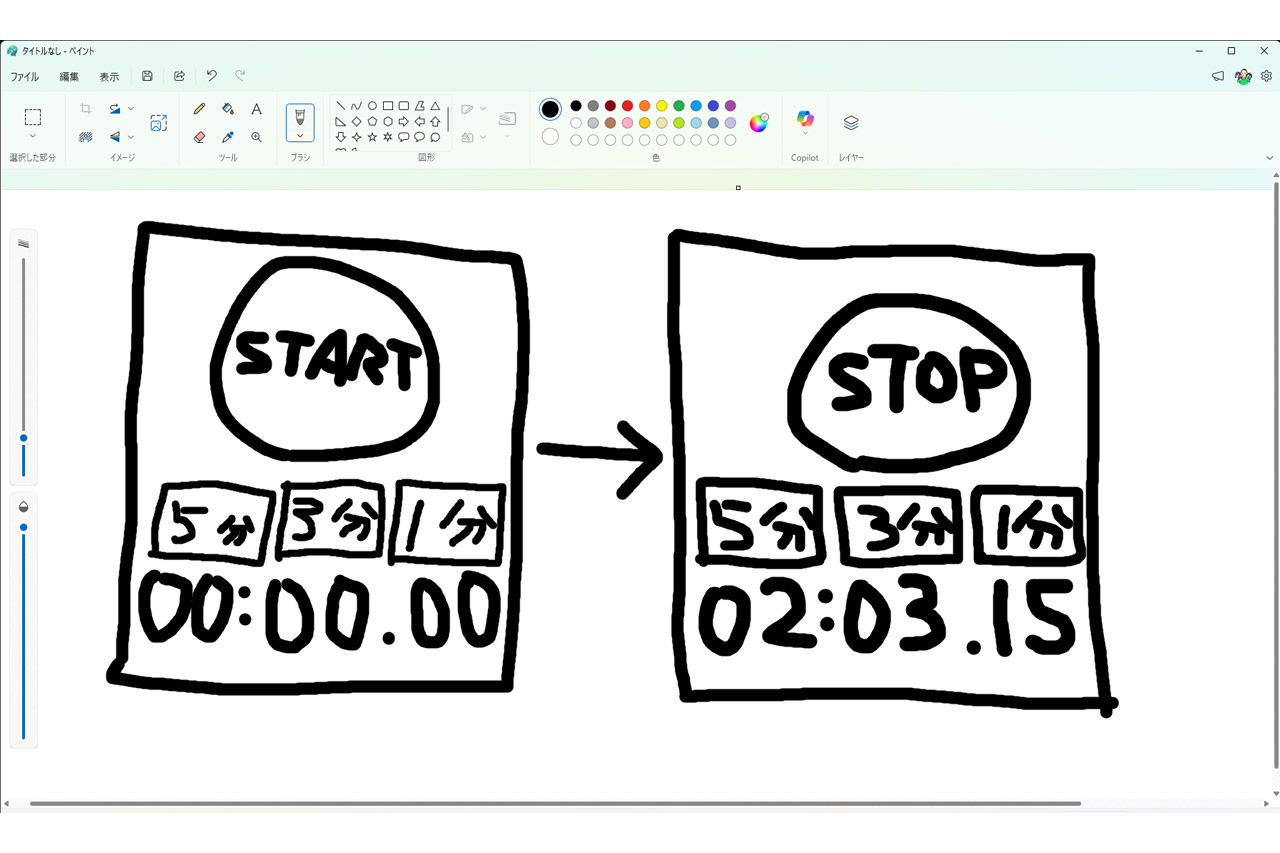
In his AI beginner series, Hisashi Hinuma sketched four buttons and a time display in Paint, dropped it into Gemini's prompt box, chose Canvas, and Gemini returned a finished timer app with color-coded start/stop buttons and tap sound effects.
Why it matters
For people who struggle to describe an app in words, a rough sketch can carry the layout while short prompts fill in each part's role — which is likely why the result kept the drawn layout yet gained a polished design.
Summaries like this, every morning.
Hinuma's piece sits at the start of an AI beginner series, and its premise is that text prompting is the hard part for many newcomers. Rather than asking them to get better at describing an app, he inverts the workflow: draw the screen layout first, then let Gemini's Canvas read it.
The trial itself was deliberately minimal — a timer app drawn as four buttons and a time display, in bare black-and-white outlines. Hinuma still added prompt text explaining what each part does, and Gemini filled the gaps: start and stop got distinct colors, a tap sound effect appeared, and arbitrary time setting worked. The drawn layout survived intact.
From there, the output is not trapped in Gemini. Downloading the code or converting it to a Google Sites web app puts it on the same account's Google Drive, reachable from a phone and publishable to other users — which is what makes the sketch-first route usable beyond a one-off demo.
Pick your industry and the AI tools you use, and get news related to your work every day.
Free · 30 seconds with Google · unsubscribe anytimeWhat is AIToday? →
Ask AI anything about this article. The AI reads this article, earlier AIToday articles, and Wikipedia, and cites its sources. Q&As are published on this page for other readers too.
Jamie Dimon said JPMorgan Chase is "not gonna allow just any" outside AI agent inside the company, warning "Yo…
Jacob Coxon, a former OpenAI and Anthropic researcher, cited an Anthropic IPO roadshow slide showing pre-train…

OpenAI is dissolving its standalone robotics team and folding researchers into the main research team under Ch…
Internal data first reported by The New York Times show only 42% of Alpha School students met its goal of lear…
Operand raised $31 million across seed and Series A funding at a $220 million valuation, in a round led by Kho…
Anthropic rolled out Claude Meetings to Team and Enterprise plans on Google Meet, letting Claude follow along…