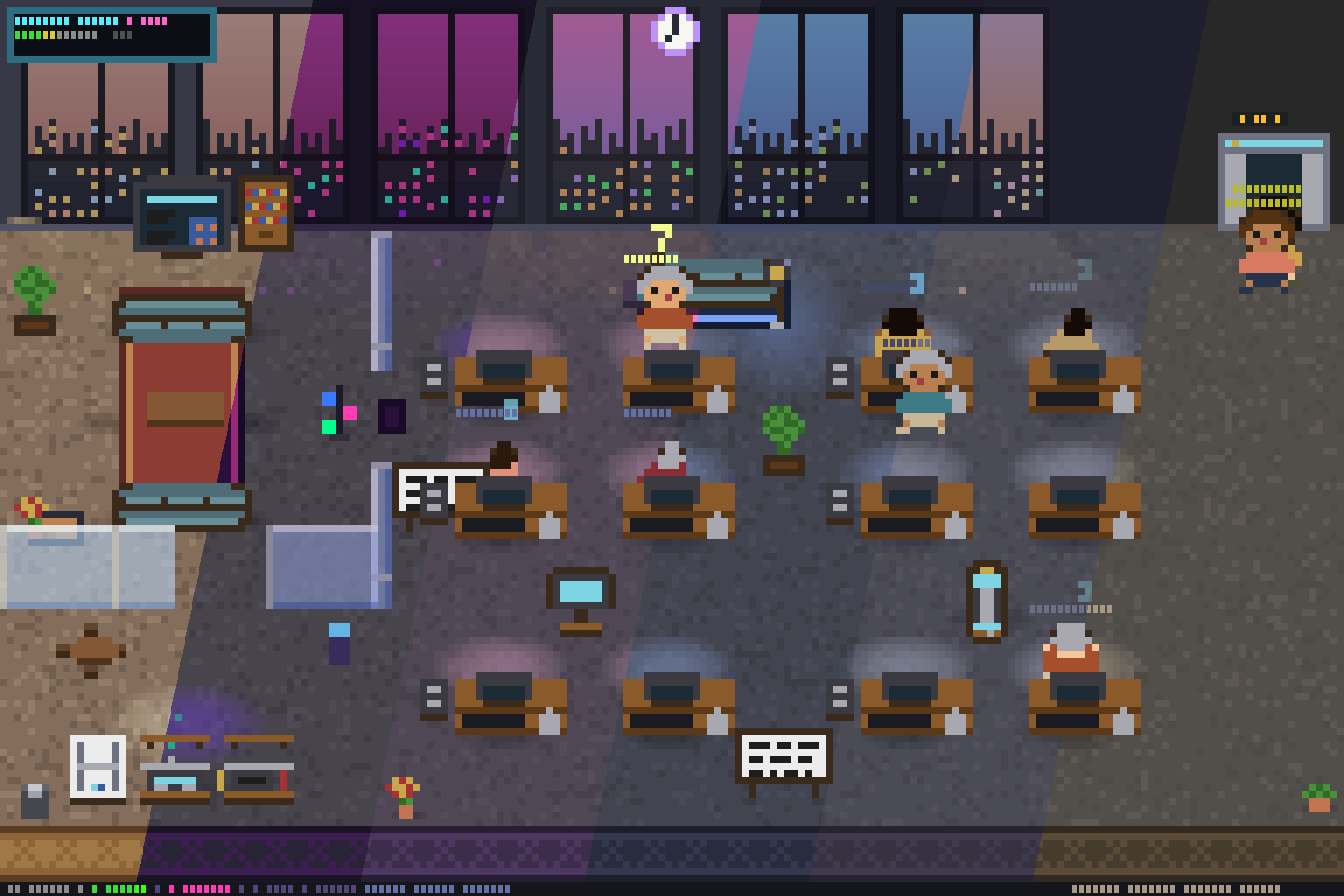
pixtuoid is a new open-source terminal dashboard that displays multiple AI coding agents as animated pixel-art coworkers in a shared office, eliminating the need to alt-tab between terminals to monitor their status. The tool integrates with ten popular agent CLIs (Claude Code, Codex, Antigravity, and others), visualizes agent activity through desk animations, tool-use color coding, and token consumption, and is available now for macOS, Linux, and Windows.
Summaries like this, in your inbox every morning.
Sign up free →What happened
pixtuoid, a new open-source tool, visualizes multiple AI coding agents running in parallel as animated pixel-art characters working at desks in a shared terminal office. Users can monitor agent status—typing, waiting for input, or idle—by glancing at a single dashboard instead of alt-tabbing between terminals.
Why it matters
Running several coding agents at once creates friction: developers must switch between terminals to track who is stuck, who needs permission, and who has finished. pixtuoid collapses that into one "glanceable multi-agent dashboard," letting teams see the whole room's activity at once. The tool supports ten agent CLIs (Claude Code, Codex, Antigravity, DeepSeek-Reasonix, and others) with no separate install step—users connect via the Sources panel and agents appear automatically.
What to watch
pixtuoid is open-source (MIT license) and available now via Homebrew, npm, Cargo, and prebuilt binaries. Installation and setup are documented on the project site; contributions are welcome, especially new themes and adapters for additional agent CLIs. The tool is local-only with no network connections or telemetry.
pixtuoid is a terminal-based multi-agent dashboard that reimagines how developers monitor parallel coding agents. Instead of alt-tabbing between terminals, users launch pixtuoid and connect their agent CLIs (Claude Code, Codex, Antigravity, DeepSeek-Reasonix, CodeWhale, Copilot CLI, opencode, Cursor CLI, Hermes Agent, Oh My Pi, OpenClaw, Grok Build, and Kimi Code CLI) via the Sources panel. Each agent appears as an animated pixel-art character at a desk in a shared office; the office auto-expands to multiple floors as agents are added.
The visual design conveys rich status information without text. Agents type while working, display a question mark when waiting for user input, and sleep under little z's when idle. Each desk's monitor glows with the tool in use: blue for Edit, orange for Bash, cyan for Read. Shirt and pants colors derive from the agent's working directory, so colleagues from the same repository appear in matching colors. A token meter stacks paper on each desk through consumption tiers (250K, 2M, 16M tokens). Users can hover over agents for session duration and tool-call counts, or hover furniture (desks, sofas, plants, vending machines, printers) for their names. The dashboard also features per-floor office pets (a cat or dog that roams and sleeps), an OpenClaw gateway mascot (a lobster whose movement reflects gateway health), and six UI themes with day/night cycles and weather effects (rain, storm, snow, fog, overcast, wind, smog). A lofi soundtrack synthesized entirely in code adjusts to time of day, activity level, and weather, with sound effects for door chimes, printers, and vending machines.
Installation is available via Homebrew, npm, Cargo, and prebuilt binaries. Users launch pixtuoid, press s to open Sources, connect their agent CLI, then start the agent in another terminal—a character walks in from the elevator within a second. Keyboard shortcuts allow navigation (q quit, p pause, t theme picker, m sound, Tab for dashboard view, arrow keys or j/k or Page Up/Down to scroll floors, click an agent to bring its terminal to front). The tool runs entirely locally with no network connections or telemetry; agent transcripts are read only to animate the office, and session data never leaves the user's machine.
Pixtuoid is open-source under the MIT license. The codebase is organized into five Rust crates with zero terminal dependencies in the core. The architecture uses a hook shim (a 200ms fire-and-forget write to a Unix socket or Windows named pipe that cannot block the agent) and JSONL transcript watching; both feed one event channel, a reducer folds events into office state, and the renderer draws half-block pixel art. Configuration lives in ~/.config/pixtuoid/config.toml (created on first launch, all keys optional); users can override settings via CLI flags. Contributing is welcomed, especially new themes, sprite polish, and Source adapters for additional agent CLIs. The project includes full architecture diagrams, a CLAUDE.md document covering load-bearing invariants, and SECURITY.md documenting trust boundaries.
The friction of monitoring multiple AI agents in parallel has been a practical pain point for developers: each agent runs in its own terminal session, forcing constant context-switching to check status. pixtuoid addresses this by borrowing UI ideas from simulation games and desktop pets—the office metaphor is not just whimsical but functional. Each agent becomes a visual character at a desk, with animation state (typing, waiting, sleeping) and desk-level metadata (token burn, tool in use, session duration) all legible at a glance. The color-coding by working directory turns the room into an implicit org chart, and the token-meter stacks paper piles to make consumption visible.
The architecture itself is lean: a hook shim (200ms, fire-and-forget, cannot block the agent) and JSONL transcript watching feed a single event channel; a reducer folds events into office state, and a renderer draws pixel art. The tool integrates with ten agent CLIs and the OpenClaw gateway by implementing a modular Source trait, making it straightforward to add support for new tools. Security is enforced locally—hook installation, socket ownership, and transcript reading are all documented in SECURITY.md—and the dependency set is audited daily for vulnerabilities.
AI-summarized, only the topics you pick — one digest a day via Email, Slack, or Discord.
Free · takes 30 seconds · unsubscribe anytime
No comments yet. Be the first to share your thoughts!
Log in to join the discussion

Get curated AI news from 200+ sources delivered daily to your inbox. Free to use.
Get Started FreeFree · takes 30 seconds · unsubscribe anytime
