What happened
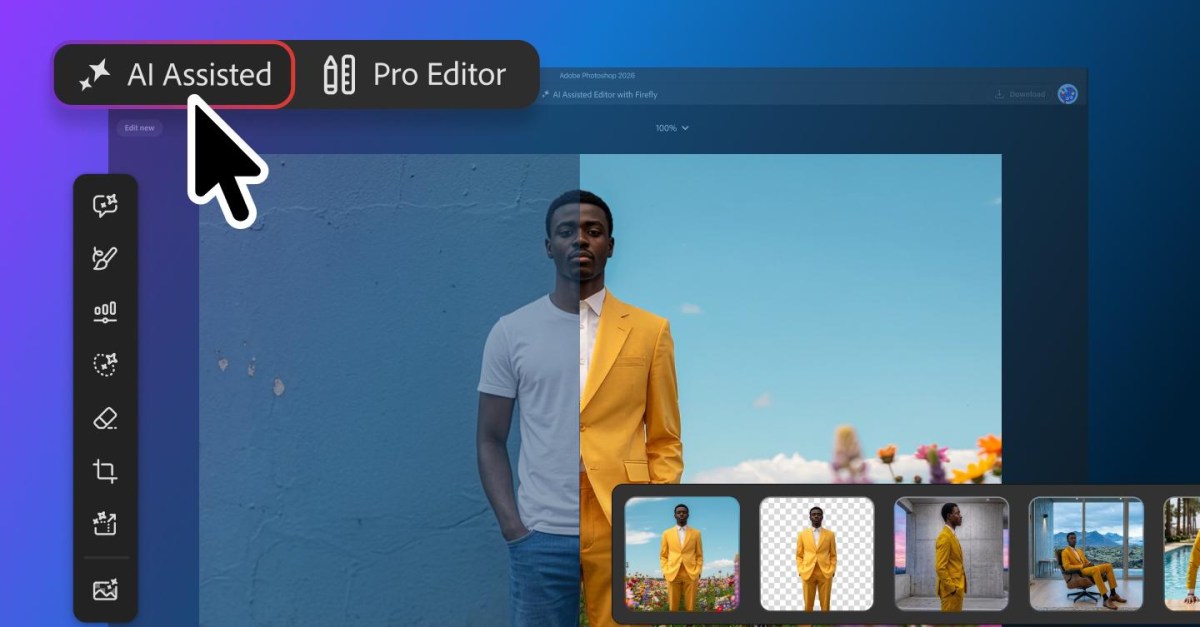
Adobe is rolling out an AI-heavy update for Photoshop, including a new "optional" interface called the "AI Assisted Editor" view. It is launching in beta and shows all AI features in a single toolbar, such as prompt-based editing, background remover, and an AI image extender.
Why it matters
Adobe is also adding a "markup" feature that lets you draw on an image to tell the AI assistant what to change, like recoloring areas or sketching arrows. This reduces the need for text prompts, making AI editing more visual and accessible.
What to watch
The update includes an enhanced "Instruct Edit with Masks" feature. Adobe says its Firefly Image 5 model now understands the entire image context, so you can describe changes like "opening closed eyes" without manually marking areas.
Summaries like this, in your inbox every morning.
This update is part of Adobe's ongoing push to integrate AI more deeply into its creative tools, focusing on making AI assistance more intuitive. The new "AI Assisted Editor" view centralizes AI features, which could streamline workflows for users who rely on multiple AI tools. The markup feature is notable because it allows non-verbal instruction, potentially lowering the barrier for users who find text prompts cumbersome.
The enhancement to "Instruct Edit with Masks" leverages the Firefly Image 5 model's improved understanding of image context. This could reduce the need for manual mask creation, making edits like changing a subject's expression or adding an accessory more straightforward. For businesses, these updates could speed up image editing tasks, but the beta status suggests Adobe is still refining the experience based on user feedback.
Pick your industry and the AI tools you use, and get news related to your work every day.
Free · 30 seconds with Google · unsubscribe anytimeWhat is AIToday? →
Ask AI anything about this article. The AI reads this article, earlier AIToday articles, and Wikipedia, and cites its sources. Q&As are published on this page for other readers too.
Vinci4D provides chip-design simulation software that trains on physics equations instead of customer data, an…
SEMI President and CEO Ajit Manocha told DIGITIMES that the semiconductor industry reached the US$1 trillion r…

CoreWeave fell more than 25% this week, its debt yield briefly rose above 16% on Thursday, and SK Hynix droppe…

Nvidia's AI Enterprise lists at $4,500 per GPU annually, and paid subscriptions add supported software, securi…

Anthropic told investors this week that it is making 85% gross margins, a figure the columnist calls a cash co…

Modal Labs, an AI infrastructure provider, raised $750 million in a Series D led by Accel at a $15.75 billion…