
What happened
The guide, based on an October 12, 2026 session, says to press Shift+Tab once so the display changes from "auto mode on" to "manual mode on", then start with a read-only request.
Why it matters
Before approving a write, readers are told to check three things — the added lines, any removed lines, and whether files they did not ask about are in scope — so unintended changes do not pile up.
Summaries like this, every morning.
The guide is built around a small practice folder holding a CSV of holidays and a short Python script that counts them by month, managed with Git, with screenshots taken from a session on October 12, 2026. Its starting point is the mode the tool launches in: in the captured environment the lower-left display read "auto mode on", meaning it proceeds without confirmation, and a single Shift+Tab changed that to "manual mode on".
The suggested sequence moves from low-risk to higher-risk work. A read-only request comes first, and Claude Code asks for confirmation before running the command that inspects file contents. A small write follows, with the advice to state what to do, where, and under what policy — for example, asking for a README.md describing the folder and how to run count_holidays.py — rather than vague instructions like "fix it" or "write tests".
The remaining discipline is about the approval screen itself: the content to be written is shown with line numbers, and the reader chooses "Yes", "Yes" (auto-approving edits for the rest of the session), or "No". The three checks before approving are the added lines, any removed lines that should not disappear, and whether unrequested files are in scope. The guide notes you can ask for an explanation of a change on the spot, and that a diff too large to read is a sign to split the request into smaller ones.
Pick your industry and the AI tools you use, and get news related to your work every day.
Free · 30 seconds with Google · unsubscribe anytimeWhat is AIToday? →
Ask AI anything about this article. The AI reads this article, earlier AIToday articles, and Wikipedia, and cites its sources. Q&As are published on this page for other readers too.
Charles Schwab is expanding AI tools for registered investment advisors, integrating Claude for Financial Advi…
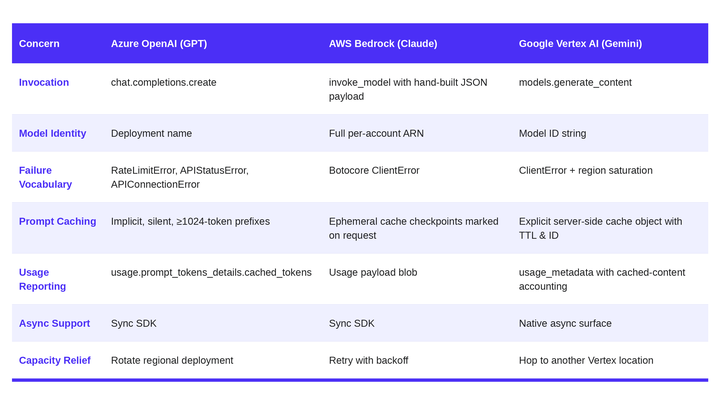
Octus says it routes more than 20 billion tokens a year through its data science models, using what it calls a…
Charles Schwab is integrating AI tools and financial planning, Bloomberg reported

Walmart introduced Agent Profiles, which launch in November and cap an agent's spending at $50, $100 or $200 o…

Alphabet's search and other revenue grew 12% year over year to roughly $63 billion, missing estimates for the…
Asahi Kasei Homes signed a basic agreement with Amazon to use Alexa+, which Amazon has started offering in Jap…