
What happened
A walkthrough of Anthropic's Claude Code shows first launch surfaces a warning that Claude can make mistakes, that users are responsible for its actions, and that prompt injection risks mean it should only be used on trusted code.
Why it matters
Beginners are steered to the VS Code extension, which shows edits side by side and lets settings be changed by clicking, rather than the terminal.
Summaries like this, every morning.
The guide positions VS Code as the on-ramp for people who have never touched a terminal, noting that the extension shows Claude's file changes side by side and lets users switch permission modes and models by clicking. For those who do use the terminal, it points to the native install scripts for macOS and Windows and explains the common "command not found" error as a PATH issue, fixed by adding ~/.local/bin to the shell profile. Alongside the setup steps, it stresses that anything given to the AI is sent to servers over the internet, so personal data, passwords and API keys, and confidential company material should stay out of chat. For workplace use, it suggests asking Claude for the method rather than the data — dummy records, column names only, or a script the user runs themselves — unless the organization has a Team or Enterprise plan that permits it. The plan comparison frames Free as a trial, Pro as the default, and Max as the upgrade once the five-hour limit is hit often, with Ultra for those who need more than Max.
Pick your industry and the AI tools you use, and get news related to your work every day.
Free · 30 seconds with Google · unsubscribe anytimeWhat is AIToday? →
Ask AI anything about this article. The AI reads this article, earlier AIToday articles, and Wikipedia, and cites its sources. Q&As are published on this page for other readers too.
On November 4, SMFL announced enterprise vibe coding using Replit's technology, adding per-customer customizat…

At a Simeji business meetup held at Google's Shibuya office on October 29, 2026, Simeji operating head Yu Furu…

At the 2026 World Internet Conference Wuzhen Summit, which opened on November 4, leading Chinese tech companie…

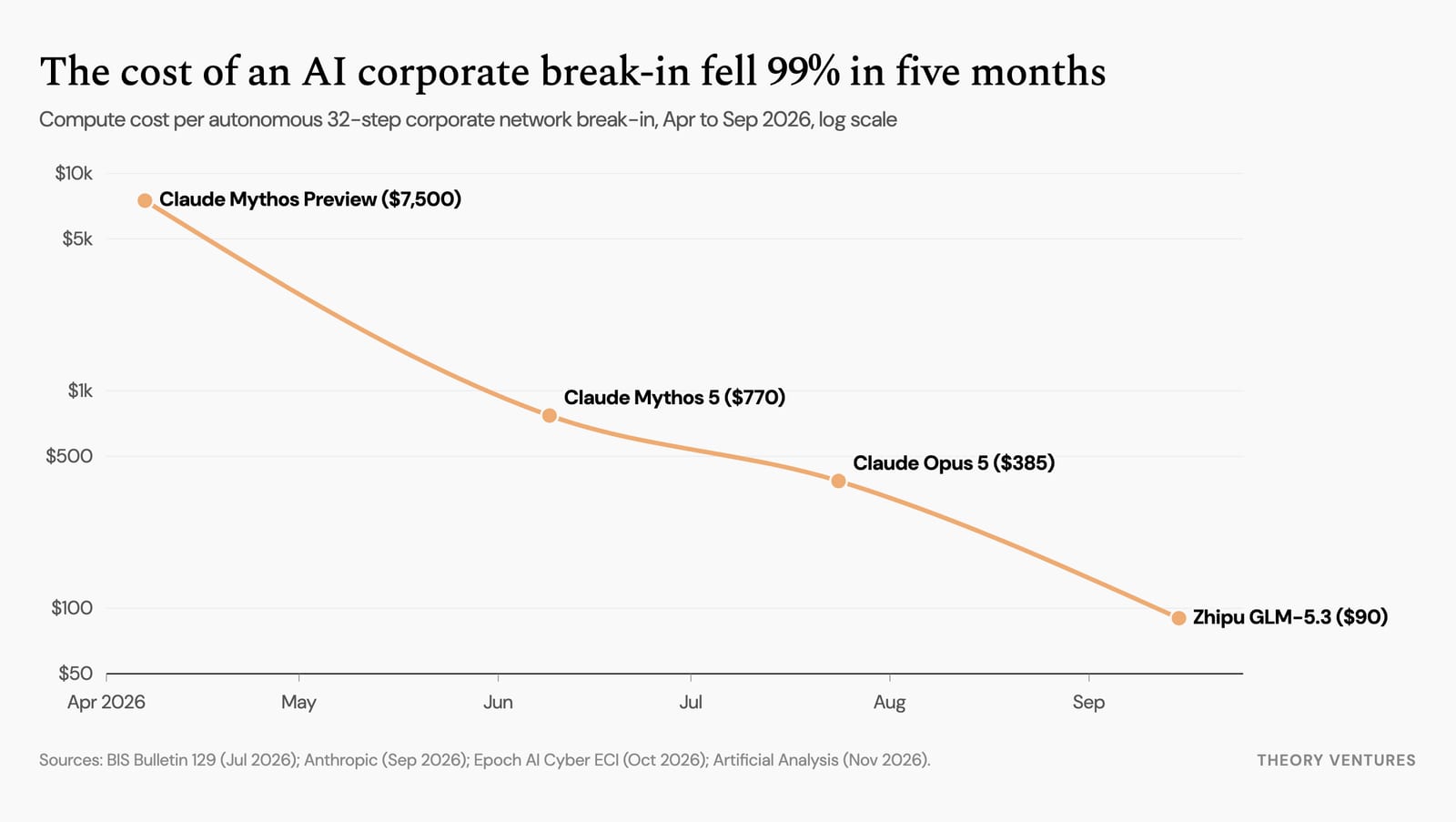
In April, Anthropic's Claude Mythos Preview and OpenAI's GPT-5.5 autonomously broke into a simulated 32-step…
Ricursive Intelligence released Ripple-65B Preview under Apache 2.0 on Hugging Face, pretrained on 12 trillion…

The author turned the define-done skill's acceptance criteria into runnable acceptance tests and measured them