What happened
On the web app, Gemini can create and edit Google Docs, Google Sheets, and Google Slides files and handle PDFs and text files; the smartphone app handles PDFs.
Why it matters
Users can turn a link into a document and restyle it in plain language, then fine-tune fonts and colors manually in the same chat.
Summaries like this, every morning.
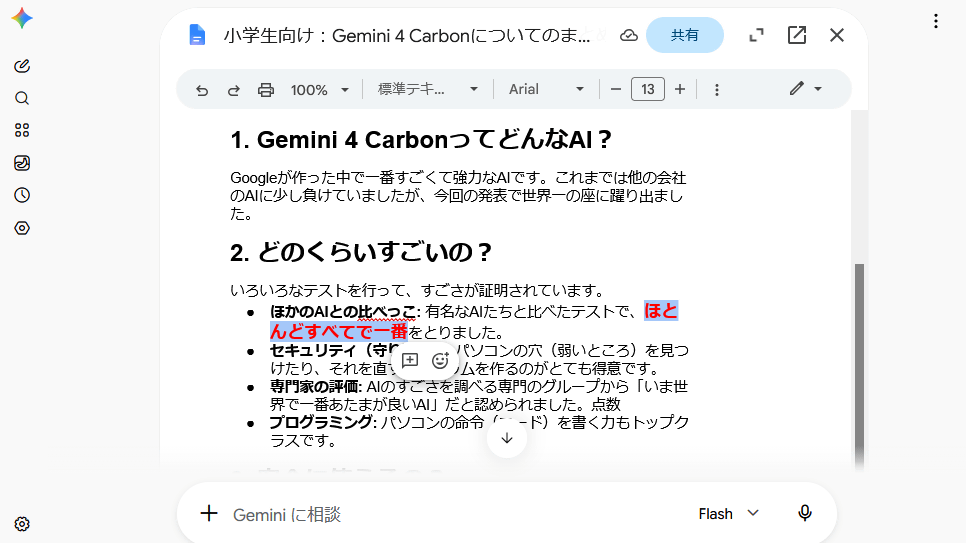
The new capability builds on Gemini's existing chat interface, which until now handled conversation and file references rather than finished office documents. GIGAZINE's test shows the workflow end to end: a URL for a GIGAZINE article about Gemini 4 Carbon was pasted into the chat with an instruction to convert it into document format, and a Google Doc appeared in the conversation.
From there, the document stayed editable both by Gemini and by hand. A follow-up prompt asked for simpler wording a grade-schooler could understand, and the response was rewritten accordingly. Manual editing behaves like a normal Google Doc, including changing fonts and text colors. The practical effect is that drafting, rewriting, and formatting can happen in one place rather than across separate apps.
Pick your industry and the AI tools you use, and get news related to your work every day.
Free · 30 seconds with Google · unsubscribe anytimeWhat is AIToday? →
Ask AI anything about this article. The AI reads this article, earlier AIToday articles, and Wikipedia, and cites its sources. Q&As are published on this page for other readers too.
Microsoft detailed an Industry Evaluation Data Generation Platform that builds fully synthetic enterprise tena…

On its third-quarter earnings call, DoorDash said third-party AI agents such as Muse, Instinct and Fo have pro…

OpenAI CEO Sam Altman said on the Cheeky Pint podcast that humanity “deserves fundamental knowledge” and that…

Epoch AI researchers found that the Chinese open-weight model GLM 5.3 autonomously built multi-stage exploit c…

A project called Ask Me Twice puts a curated, evolving set of 137 questions to 44 AI models every day and reco…

Mistral published open weights for Mistral Large 4, a 1.05T-total, 52B-active model with 1M context and text+i…