What happened
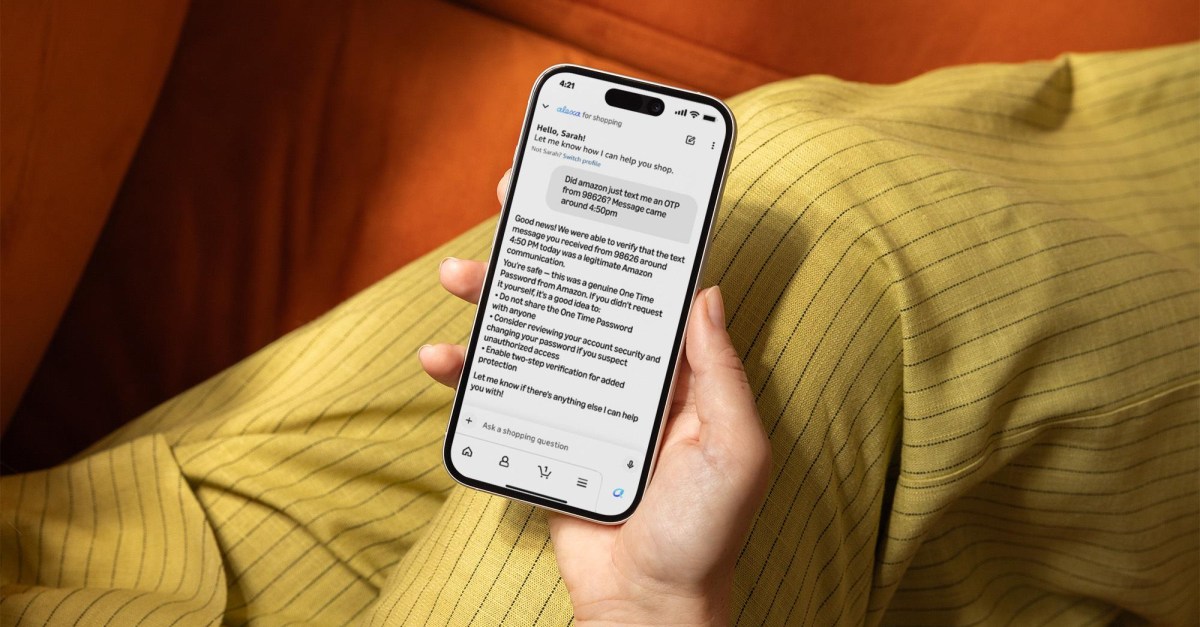
Amazon has updated Alexa for Shopping so it can check whether an email, text message, or phone call really came from Amazon. You can ask the assistant about a message you received, and it compares it against a record of every message Amazon has sent, plus its contents, formatting, and sender.
Why it matters
This is aimed at fighting impersonation scams. The assistant only confirms a message is real if it is “completely certain,” and if it decides a message is not from Amazon, it tells customers to check orders in the app and contact Amazon support directly.
What to watch
An example shows a customer asking if Amazon sent a One Time Password (OTP) from 98626 at 4:50pm, and Alexa confirms it was genuine. Amazon also launched a similar feature earlier this year letting you forward suspicious messages to verify@amazon.com, and added an “Update Me When” feature to track product releases.
Summaries like this, in your inbox every morning.
Amazon is expanding its AI assistant's role to address a common consumer problem: impersonation scams. The new feature lets Alexa for Shopping verify whether a message is genuinely from Amazon by cross-referencing it against Amazon's outbound message records and analyzing details like content, formatting, and sender. This follows a similar tool introduced earlier this year involving forwarding suspicious messages to verify@amazon.com, showing a push toward building consumer trust in digital communications.
The feature appears designed to give customers a quick, reliable way to confirm legitimacy before falling for a scam, especially since the assistant only certifies a message as real when it is completely certain. When it cannot confirm authenticity, it guides users toward safer steps like checking orders in the app and contacting support. This practical application of AI could help reduce the impact of phishing attempts that impersonate well-known brands.
Amazon has also been updating Alexa for Shopping with other capabilities, such as an "Update Me When" feature for tracking new product releases. While this update focuses on scam detection, it signals a broader trend of AI assistants moving from simple queries to proactive assistance in daily tasks, which may be useful for busy consumers who want faster, more reliable digital interactions.
Pick your industry and the AI tools you use, and get news related to your work every day.
Free · 30 seconds with Google · unsubscribe anytimeWhat is AIToday? →
Ask AI anything about this article. The AI reads this article, earlier AIToday articles, and Wikipedia, and cites its sources. Q&As are published on this page for other readers too.
The Mary Sue reports on a man's frustration with AI customer service at The Home Depot

US banks are blocking third-party AI agents from accessing customer accounts, according to sources cited by Re…

P&G CFO Andre Schulten said the company is proactively preparing for AI agents that place orders and reshape s…
U.S. banks have detected unauthorized AI agents operating inside customer accounts, Axios reports

Axios reports that unvetted AI agents are accessing U.S

Walmart has introduced new tools intended to strengthen AI protections and increase transparency, according to…