What happened
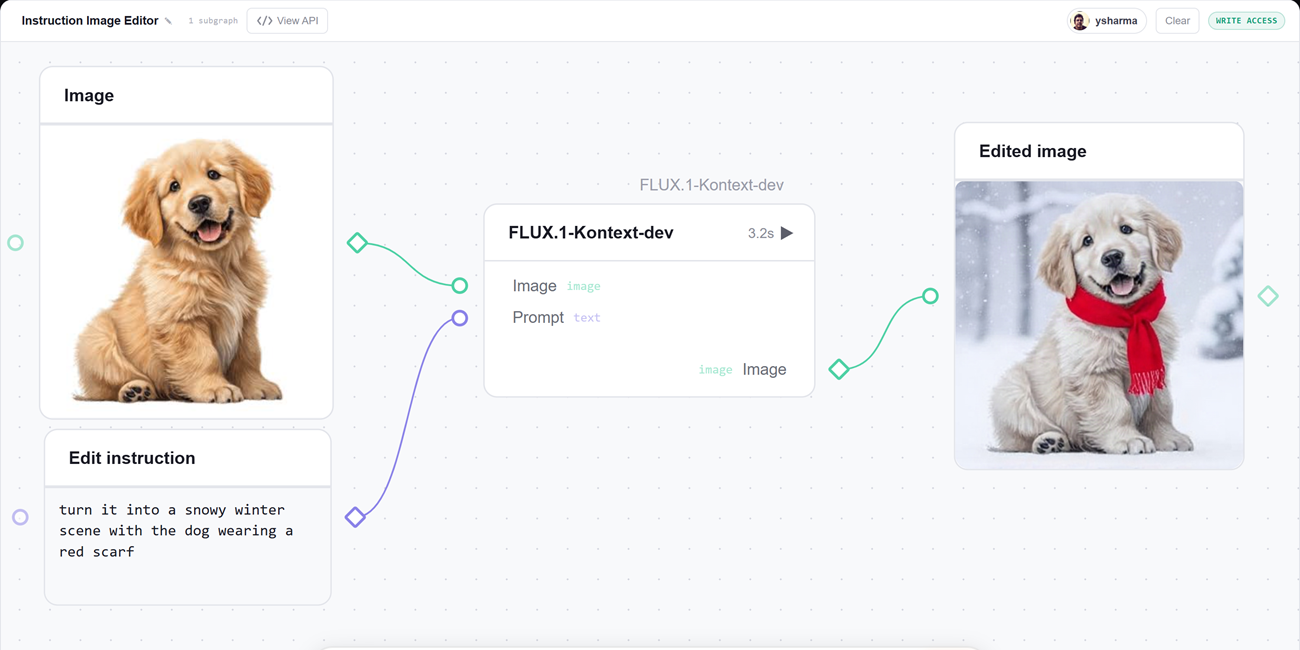
Hugging Face has introduced gr.Workflow, built into Gradio, which lets users describe AI pipelines as graphs of typed nodes. The workflow serves as a drag-and-drop canvas where every node is runnable and each intermediate result is visible.
Why it matters
This makes complex AI pipelines — like generating an image, removing its background, or creating a voiceover — accessible as a visual interface rather than requiring Python scripting and print-debugging. Each workflow also becomes a REST API and can be deployed to Hugging Face Spaces with one command.
What to watch
Every workflow output becomes a REST endpoint named after its label, callable from Python or curl. Users can also run their own GPU models inside a Space by decorating a function with @spaces.GPU, and Hugging Face says even something as involved as AUTOMATIC1111 can be built this way.
Summaries like this, in your inbox every morning.
The announcement positions gr.Workflow as a way to make AI pipelines themselves the interface, rather than hiding them behind code. The examples on the blog show a spectrum: from a simple single-node image editor to a multi-branch media studio that chains several models and Spaces. This variety suggests the design goal is to cover both lightweight demos and more production-like arrangements where each output also becomes a callable endpoint.
The fan-out pattern is highlighted repeatedly, where one input feeds multiple operators running in parallel — as in the Generative Art Lab and the dataset profiler. The ZeroGPU example adds another layer, allowing an fn node to run a model inside the Space on demand, with a GPU grabbed and released for each call. This means users are not limited to external Inference Providers or pre-built Spaces.
For a business reader, the practical significance lies in the low barrier to entry: clicking Duplicate on any demo to rewire it, or starting from a few lines of Python. Each workflow ships with REST endpoints automatically, which could let teams integrate AI steps into existing applications without building custom glue code. The promise that something as complex as AUTOMATIC1111 can be built this way hints at the intended scale, with a follow-up post planned to walk through that build step by step.
Pick your industry and the AI tools you use, and get news related to your work every day.
Free · 30 seconds with Google · unsubscribe anytimeWhat is AIToday? →
Ask AI anything about this article. The AI reads this article, earlier AIToday articles, and Wikipedia, and cites its sources. Q&As are published on this page for other readers too.
Meta's Muse personal AI agent, launched Sept

On July 18, Anthropic's Claude Haiku 4.5, tasked with example tasks on random webpages, filled out a form on P…
Bank of America projected the data center CPU market will grow from around $61.4 billion this year to $210.6 b…

OpenAI released more than 700 manuscripts on October 6, 2026, claiming solutions to hundreds of open math prob…
OpenAI documented three new cases of misaligned model behavior

Microsoft launched Decision-1, built on Qwen3.5-9B, which Microsoft says tops 36 benchmarks covering nearly 15…