AIToday
Large Language ModelsAI Business & IndustryLatent SpacePublished: Aug 5, 2026, 04:00 JST7 min read

OpenAI Launches ChatGPT Work, Agent for Cloud-Based Knowledge Tasks

OpenAI Launches ChatGPT Work, Agent for Cloud-Based Knowledge Tasks

Key takeaway

  • OpenAI released ChatGPT Work on July 9th, an agent product that runs knowledge-work tasks in the cloud and connects to dozens of workplace tools like Slack and Gmail.

  • It reached 10 million users in three weeks and will merge with the main ChatGPT app by end of year, meaning it previews how ChatGPT's billion weekly users will soon work.

  • The agent can suggest personalized tasks based on your calendar and email and run automations on a schedule, marking an early step toward AI that figures out what you need without being asked.

3 Key Points

  1. What happened

    OpenAI released ChatGPT Work on July 9th, a new agent product for knowledge work that connects to Slack, email, Drive, calendars, and hundreds of other tools. Three weeks in, Work and Codex have reportedly crossed 10 million users. The product runs on cloud computers (Pro accounts get 8 CPUs, 20GB of RAM, and a 64GB disk; Plus gets 14GB of RAM) and can produce artifacts like sheets, docs, slides, and hosted web apps.

  2. Why it matters

    Work is being rolled into ChatGPT's core experience—Chat and Work will merge by end of year—meaning it previews how ChatGPT's billion weekly users will soon interact with the app. The product takes a credible first step toward proactive AI: it suggests personalized tasks based on user context (calendar events, email, preferences) and can run automations on a schedule without manual prompting, though today it still waits for the user to execute suggested tasks.

  3. What to watch

    Work's architecture splits agent freedom within individual tasks from cross-task continuity, which runs through ChatGPT's product layer rather than the computer itself—a deliberate guardrail OpenAI has chosen over unrestricted access. The company has not yet deployed a meta-layer agent that coordinates between tasks and projects, which some users already attempt with Codex; that could arrive as the product matures.

In Depth

Read the full story

On July 9th, OpenAI released ChatGPT Work, positioning it as the agent for knowledge work at scale. The launch was substantial: three new models across fourteen configurations, a consolidation of the ChatGPT and Codex desktop apps, and cloud agents brought to the mainstream in their most accessible form yet. Within three weeks, Work and Codex had reportedly crossed 10 million users.

At its core, Work is an agent for knowledge work that connects to the places users already work—Slack, email, Drive, calendars, CRMs, project trackers, and hundreds of plugins—and gathers context across all of them to produce finished work. The product runs on the Codex harness, inheriting the same models, sub-agents, and browser use capabilities, with the ability to work on a task for hours. Crucially, Work lives in a cloud computer: a managed, isolated microVM. Pro accounts receive 8 CPUs, 20GB of RAM, and a 64GB disk; Plus accounts get 14GB of RAM. Alongside the VM, Work gets a managed Chrome service that the agent operates through tool calls. It produces artifacts—sheets, docs, slides rendered in interactive viewers, and Sites, which are hosted web apps and dashboards that the agent can build, share via URL, and keep updated.

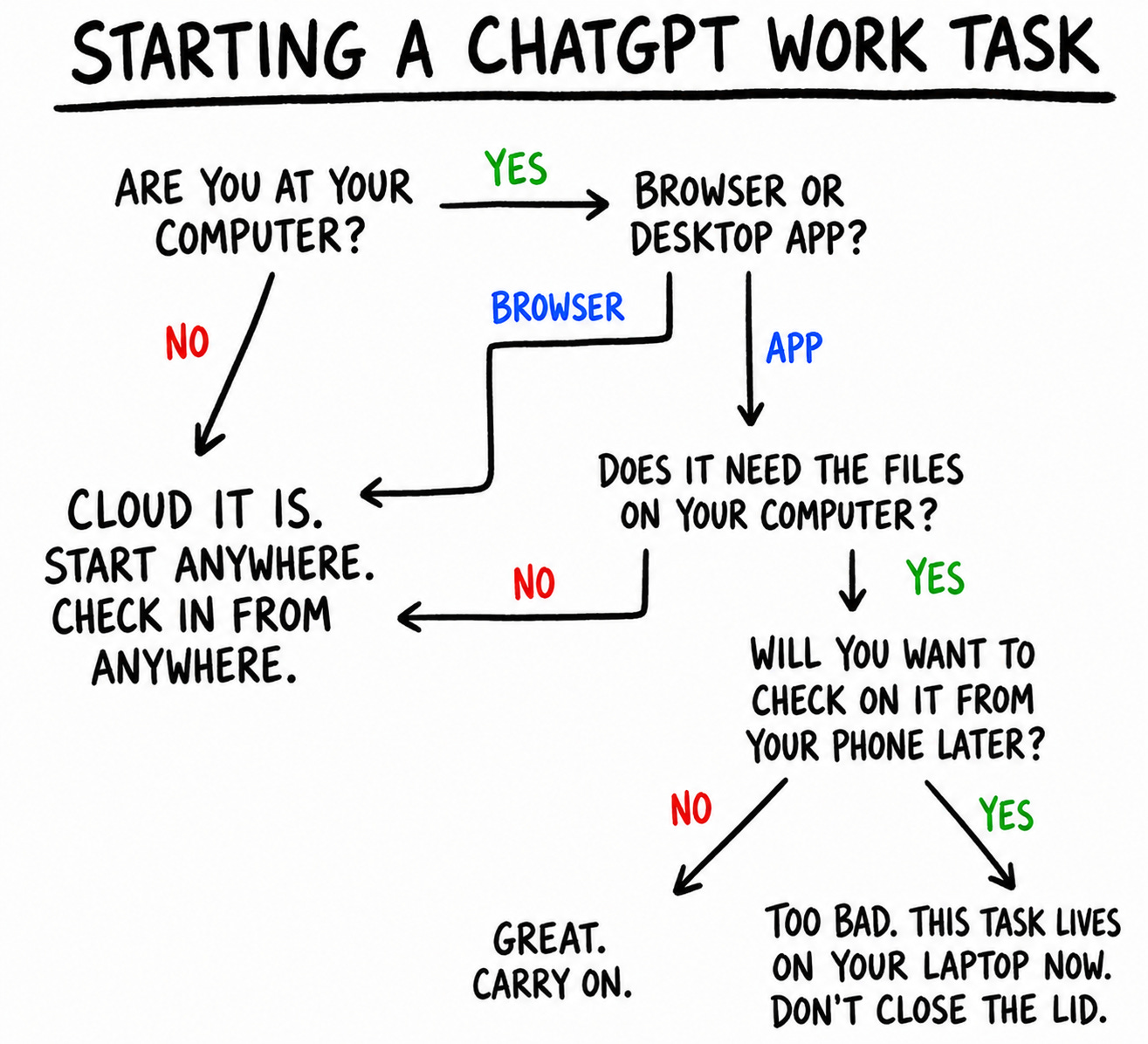
Each new conversation in Work is called a task. On web and mobile, Work runs in the cloud. Users can kick off a task on web, track progress and give directions in the ChatGPT app on mobile, then view the result back on laptop. On the desktop app, Work comes in two modes: cloud and local. In cloud mode, tasks sync across all devices. In local mode, the agent works directly on the user's machine with full computer use; these tasks do not appear on web or mobile. Within a task's working directory (/workspace/scratch), the agent has broad freedom: it can make folders, install dependencies, write scripts, keep databases, and search with ordinary Linux commands. When a task needs context from other threads, however, the agent does not treat their working directories as a shared workspace. Instead, continuity runs through ChatGPT's product layer. By default, each new thread receives a compressed summary of recent tasks and files. When a task needs context from previous threads, it calls Personal Context, a dedicated tool that queries Chat and Work history through a separately managed service and returns relevant excerpts. Files follow the same pattern: ChatGPT's Library is the central repository, but it does not live on the computer and can only be reached through dedicated tools. Notably, if Thread A uploads a file and Thread B later changes the Library version, Thread A continues to read its stale local copy when resumed. Memory is managed externally too; the agent can reason from ChatGPT's synthesized user profile but cannot modify it. ChatGPT's Projects carry over into Work, grouping related conversations, standing instructions, and user-uploaded Sources, with a new task receiving its instructions and relevant summaries—but the Project itself does not exist on the computer as it does in Codex.

The separation of task-level freedom from cross-task continuity serves several purposes. Work builds on existing ChatGPT primitives that already serve a billion users; ripping them out and rebuilding inside the computer would require costly refactoring. The separation also acts as a guardrail: OpenClaw-style unrestricted access to a single environment holding every file, conversation, and memory is unsafe for users. Finally, it lets OpenAI maintain control of the product—what users see in the UI, how context is managed, sharing, cross-device sync, and file versioning. What Work lacks today is a meta-layer agent that operates above individual tasks and projects and coordinates between them; that may be coming as the architecture evolves. Work is still young, and the architecture could look very different in weeks.

One of Work's most compelling features is an early glimpse of proactivity. When users open a new Work conversation, they receive personalized tasks generated from their own context. Work reasons asynchronously across user data—noticing calendar events, inferring that preparation would help, pulling data from Calendar and Gmail, and framing tasks around preferences in the user's memory profile. One suggestion offered preparation for an upcoming call; when selected, Work injected a pre-authored prompt and produced a meeting brief. Today, Work suggests tasks; nothing happens until the user executes them. For true proactivity, it would have to complete predicted tasks without the user in the loop—a future that does not seem far off. Work also supports automations, which let tasks run at a future time or on a recurring schedule without manual prompting. They come in two types: standalone scheduled tasks that begin each run from a saved prompt and open a fresh task for the result (suited to self-contained work like daily briefings or weekly job searches), and scheduled tasks inside existing conversations triggered by a "heartbeat" that reawaken the task with its context intact (suited to monitoring long-running operations or polling connected services). Either automation can be set up as one-time or recurring, with triggers that can be an exact time, a loose window like "in the morning," or a condition the agent monitors. Users can manage automations inside a conversation by asking Work to create, inspect, or modify them, or through the Scheduled page, which displays every task with its next run and recent results, plus controls to create, edit, pause, or delete them. The Scheduled page also surfaces ChatGPT's suggestions for custom automations, some generic (like a Daily Brief) and others personalized to the user's needs.

Context & Analysis

ChatGPT Work represents OpenAI's most accessible deployment of cloud agents to a mainstream audience. By embedding it directly into ChatGPT—which has crossed 1 billion weekly active users this month—OpenAI is positioning agents not as a specialized tool for developers or power users, but as the default interface for how a billion people will soon work. The architecture reflects deliberate trade-offs: rather than giving the agent unrestricted access to a single computer holding every file, conversation, and memory (as OpenClaw did), OpenAI has separated task-level freedom from cross-task continuity. Within a task, the agent can create directories, install dependencies, and manipulate files freely; across tasks, continuity flows through ChatGPT's existing product layer—Conversations, Library, Personal Context, Memory—which the company already operates at scale. This split serves as both a technical necessity (refactoring proven infrastructure would be costly) and a guardrail (unrestricted access poses user safety and data governance risks). Work's early steps toward proactivity—suggesting personalized tasks based on calendar and email context—hint at where OpenAI believes the product is headed, though today the user remains the triggering agent. The absence of a meta-layer coordinator that could manage work across multiple tasks and projects suggests this capability is still being designed.

FAQ

What tools does ChatGPT Work connect to?
Work connects to Slack, email, Drive, calendars, CRMs, project trackers, and hundreds of other plugins.
How many users has ChatGPT Work gained so far?
Three weeks after launch on July 9th, Work and Codex have reportedly crossed 10 million users.
Can Work tasks run automatically without user input?
Work supports automations that can run tasks at a future time or on a recurring schedule. However, today Work suggests personalized tasks to users but does not complete them without the user executing them; true proactivity where the agent completes predicted tasks on its own is described as a future capability.

Get the latest Large Language Models news every morning

AI-summarized, only the topics you pick — one digest a day via Email, Slack, or Discord.

Free · takes 30 seconds · unsubscribe anytime

Ask AI

Ask AI anything about this article. Q&As are published on this page for other readers too.

Related Articles

Next articleGitHub Copilot Agent now stable for .NET and Python

The AI news that matters, in one minute each morning.

Sign up free