AIToday

macOS app brings on-device AI clipboard actions, no cloud needed

Hacker News2h agoSend on LINE
macOS app brings on-device AI clipboard actions, no cloud needed

Key takeaway

apfel-clip is a free macOS app that performs AI transformations on clipboard content—such as fixing grammar, explaining code, or parsing JSON—entirely on your local machine using Apple Intelligence, with no cloud or API keys involved. Users copy text, press a hotkey, pick an action, and get the result instantly, making it useful for developers and writers who need quick text processing while keeping sensitive information private.

Summaries like this, in your inbox every morning.

Sign up free →

3 Key Points

  • What happened

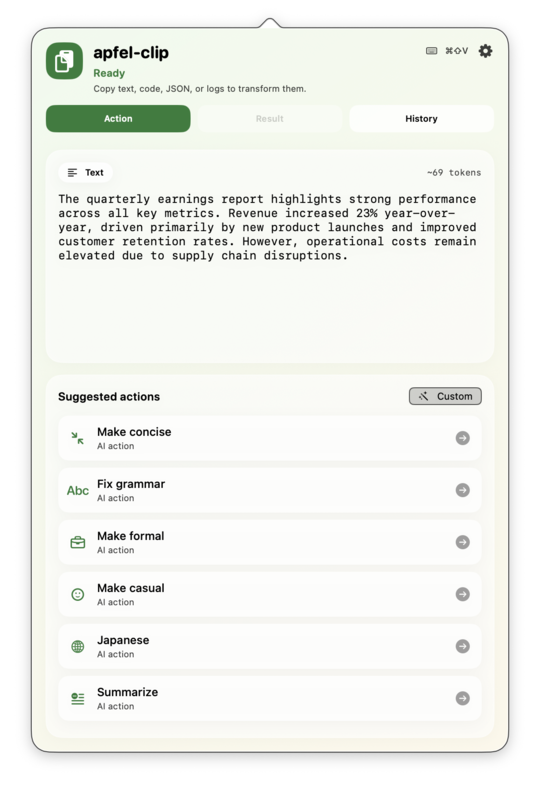
    apfel-clip, a free macOS menu bar app, lets users copy text, code, or errors and transform them with AI by pressing ⌘⇧V — all processing happens on-device using Apple Intelligence, with no cloud uploads or API keys required.

  • Why it matters

    The app removes friction from common text tasks (grammar fixes, code explanations, JSON parsing, error diagnosis) by detecting content type automatically and showing only relevant actions; everything stays private on your Mac, making it safe for sensitive code or data.

  • What to watch

    Requires macOS 26 (Tahoe), Apple Silicon (M1 or later), and Apple Intelligence enabled; the app is free, MIT-licensed open source, and available via direct download, Homebrew, or GitHub source build.

In Depth

apfel-clip is a macOS menu bar application that simplifies text transformation by integrating on-device AI into the copy-paste workflow. The three-step flow is straightforward: users copy any content (text, code, a stack trace, JSON), press ⌘⇧V to open the action popover, and select a transformation. The result lands in the clipboard instantly, ready to paste or review in the integrated result panel. The app detects content type automatically—when you copy code, code-specific actions appear; when you copy prose, grammar and tone actions surface; errors and JSON get their own tailored options. All processing uses apfel, Apple's on-device AI engine bundled inside the app, so nothing leaves your Mac and no API keys are needed. The interface includes a result view that shows the original and transformed text side by side, allowing in-place edits, re-runs, or one-click copy. A persistent local history saves every transformation, so users can revisit or re-copy past results without reprocessing. Beyond built-in actions like "fix grammar," "rewrite tone," "translate," "summarise," and "explain code," users can create custom actions from any prompt and name them; these appear in the action list automatically. The app supports favourites, hiding, and drag-to-reorder, so users can shape their action list to their workflow. An optional auto-copy feature sends results directly to the clipboard the moment transformation finishes. Installation is minimal: download the signed, notarised arm64 zip, unzip, drag the .app to Applications, and run it. The app is free and MIT-licensed open source, available on GitHub, and can also be installed via Homebrew for automatic updates. System requirements are macOS 26 (Tahoe), Apple Silicon (M1 or later), and Apple Intelligence enabled in System Settings with English device language; no other software or configuration is needed.

Context & Analysis

apfel-clip addresses a practical workflow gap: most AI clipboard tools require cloud connectivity, API keys, and accept the privacy trade-off of sending data to remote servers. By leveraging Apple Intelligence—the on-device ML engine built into macOS 26—the app eliminates that friction. The requirement for macOS Tahoe and Apple Silicon (M1 or later) narrows its audience to recent Mac users, but for that group it removes setup overhead; there are no API keys to manage, no accounts to create, and no network latency. The app's design philosophy is speed and transparency: copy, hotkey, pick, paste. Content-aware detection means users are not shown irrelevant actions, and persistent local history lets users revisit past transformations without rerunning the model. The open-source MIT license invites contribution, which may expand the action library over time.

FAQ

What are the system requirements to run apfel-clip?
The app requires macOS 26 (Tahoe), Apple Silicon (M1 or later), and Apple Intelligence enabled in System Settings with English device language.
How do I install apfel-clip?
Download the free zip file, unzip it, drag apfel-clip.app to your Applications folder, and open it; alternatively, install via Homebrew with `brew install --cask arthur-ficial/tap/apfel-clip` or build from GitHub source.
What types of content can apfel-clip transform?
The app detects text, code, JSON, and error messages, then shows relevant actions—text actions include grammar fixes and tone rewrites; code actions include explanations and bug detection; it also handles stack traces and other formats.

Get the latest Large Language Models news every morning

AI-summarized, only the topics you pick — one digest a day via Email, Slack, or Discord.

Free · takes 30 seconds · unsubscribe anytime

Discussion

No comments yet. Be the first to share your thoughts!

Log in to join the discussion

Related Articles

Stay ahead with AI news

Get curated AI news from 200+ sources delivered daily to your inbox. Free to use.

Get Started Free

Free · takes 30 seconds · unsubscribe anytime