
What happened
The guide sets up VS Code, Rojo and Claude Code so that a Japanese instruction like "make a server script that greets players" produces src/server/Greeting.server.luau, which Rojo detects and syncs to Roblox Studio over localhost:34872.
Why it matters
Because Rojo picks up each file Claude Code rewrites and pushes it into Studio automatically, developers skip the manual copy-paste step this setup is meant to eliminate.
Summaries like this, in your inbox every morning.
The guide frames the friction it removes as copy-paste: in a normal Roblox workflow, code written outside Studio has to be moved into it by hand, and this setup replaces that step with a file watcher. Rojo's role is to bridge the two, and its plugin shows "Connected to session ... at localhost:34872." once Studio and the local server are talking.
The instructions also include the kinds of obstacles a first-time user runs into. On macOS, a downloaded Rojo binary can be blocked by Gatekeeper with a "developer cannot be verified" message, so the guide walks through clearing the quarantine attribute and confirms success when a version such as Rojo 7.7.1 prints.
A CLAUDE.md file at the project root is offered as the way to keep the AI consistent, holding the folder mapping and the naming rules for server, client, and module scripts. The example interaction — asking in Japanese for a greeting script and getting src/server/Greeting.server.luau that prints a welcome message for each joining player — is presented as the normal loop under this setup.
Pick your industry and the AI tools you use, and get news related to your work every day.
Free · 30 seconds with Google · unsubscribe anytimeWhat is AIToday? →
Ask AI anything about this article. The AI reads this article, earlier AIToday articles, and Wikipedia, and cites its sources. Q&As are published on this page for other readers too.
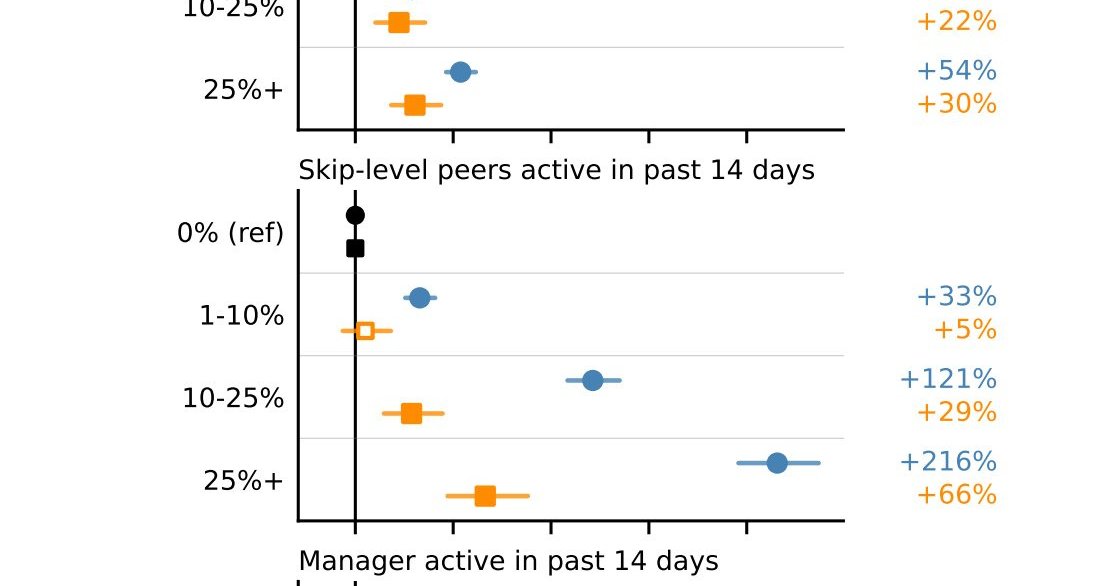
Researchers at Microsoft published a paper titled "Adoption and Impact of Command-Line AI Coding Agents: A Stu…
Meta released open weights for Muse Spark Open, an 816B-parameter model built for coding and long-running agen…

In a Zenn article, EC自動化工房 laid out a pre-generation cleanup step for product masters, adding notation rules t…
OpenAI announced GPT-6 Sol / Luna in September 2026, and the notable change was not the top model's performanc…
Three one-line requests and three requests with written completion criteria to Claude Code produced functional…
A five-person team running a Claude Code-based development setup split each decision record's reason into 推奨理由…

