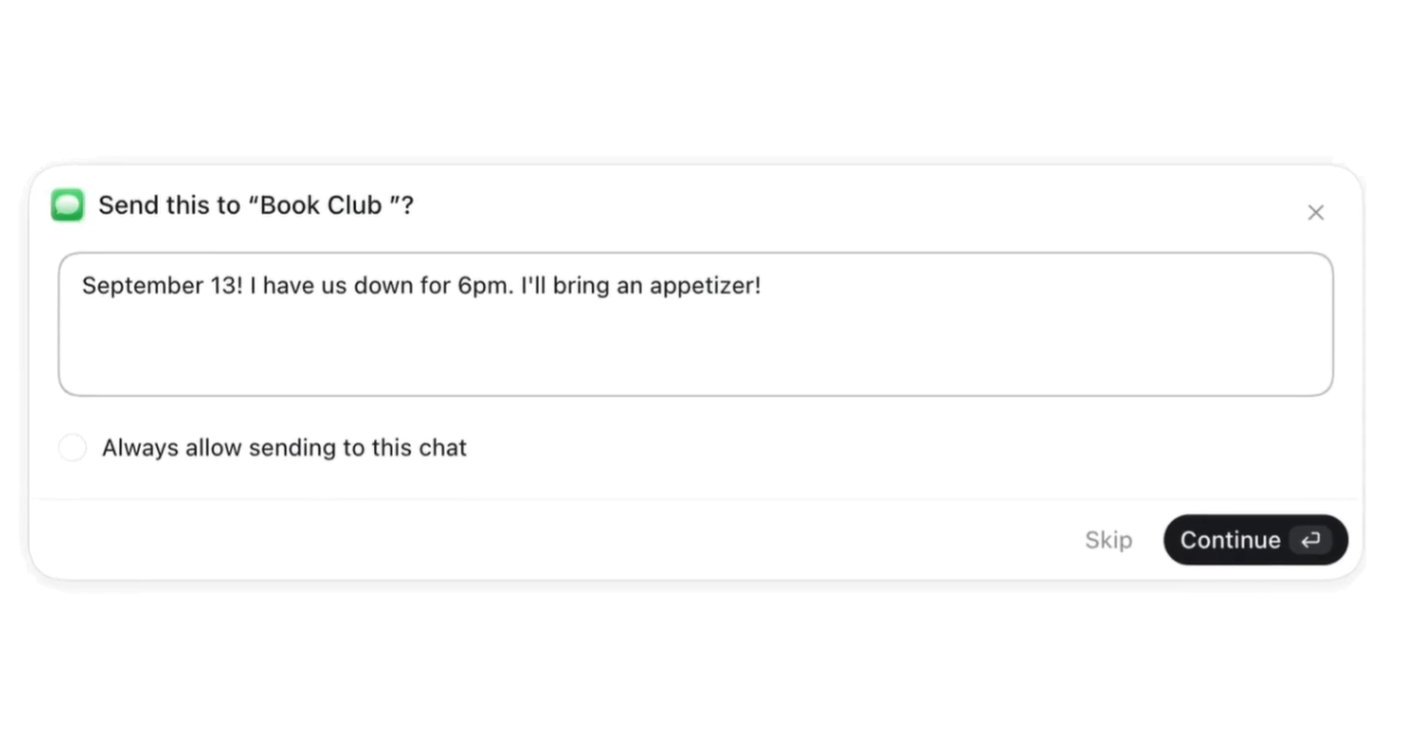
OpenAI has released a Messages plugin for macOS ChatGPT that searches, summarizes, and drafts messages from Apple's Messages app.
The feature is available now but limited to Codex and ChatGPT Work chats on Apple silicon builds.
Messages require user approval before sending by default, though users can opt to allow automatic sending to specific conversations.
What happened
OpenAI released on August 20 a plugin for the macOS ChatGPT desktop app that integrates with Apple's Messages application, allowing ChatGPT to search, summarize, draft, and send iMessage, SMS, and RCS conversations on behalf of the user.
Why it matters
The plugin automates message-related tasks—such as finding follow-ups from prior messages, extracting birthdays for calendar entry, or identifying spam—without leaving the desktop app. However, availability is limited: it works only in Codex and ChatGPT Work chats on Apple silicon builds, not in standard ChatGPT chats or Web/mobile versions.
What to watch
OpenAI has built in privacy safeguards: by default, ChatGPT shows a confirmation dialog before sending each message, with options to approve once or allow future sends to a specific chat without approval. The company warns against the "Always allow" setting in conversations that may contain unreliable or misleading instructions, since it bypasses final human review.
Ask the AI about this article →
OpenAI's Messages plugin for macOS extends ChatGPT's reach into Apple's native messaging ecosystem, automating routine communication tasks directly from the desktop. The August 20 release targets power users of Codex and ChatGPT Work—premium or professional tiers—rather than casual ChatGPT subscribers, signaling a focus on workplace productivity.
The restrictive availability—Apple silicon builds only, excluded from Web and mobile, unavailable in standard ChatGPT chats—suggests a measured rollout. The approval-gate design reflects OpenAI's stated concern about sending messages on behalf of users without safeguards; the default "ask each time" posture mitigates the risk of unintended messages, though users can override it if they trust the automation.
Managed workspace administrators can disable the feature entirely, indicating that OpenAI anticipates enterprise deployment and has built in IT controls. The known issue with "Full access" permission blocking the approval prompt suggests the feature is not yet fully hardened.
AI-summarized, only the topics you pick — one digest a day via Email, Slack, or Discord.
Free · takes 30 seconds · unsubscribe anytime
Ask AI anything about this article. Q&As are published on this page for other readers too.
Anthropic plans to "match or beat" the size of SpaceX's $75 billion IPO (or $86.2 billion including the over-a…

Pew Research released a study on Thursday finding that over one-third (35%) of English-language web pages publ…
The article argues that non-expert managers and consultants—people whose only exposure to AI comes from ChatGP…
OpenAI's GPT-5.6 Sol, launched July 9, drove a 35 percent revenue increase this quarter, with enterprise reven…

OpenAI is previewing transparent background support for GPT-Image-2 through its API, allowing users to generat…

HP Korea has formed a partnership with Upstage, a large language model (LLM) startup, to advance its localized…