AIToday

OpenTakeoff: free, open-source tool lets AI agents measure building plans

Hacker News4h ago
OpenTakeoff: free, open-source tool lets AI agents measure building plans

Summaries like this, in your inbox every morning.

Sign up free →

3 Key Points

  • What happened

    OpenTakeoff, a free open-source web tool for measuring quantities off building plans (called takeoffs), launched with a new feature in July 2026 — an MCP server that lets AI agents drive the measuring engine directly, accessing the same flood-fill room-tracing tool that human estimators use.

  • Why it matters

    Until now, no open-source web-based takeoff canvas existed, and none built for AI agents. This tool lets both people and agents measure real building plans the same way, with every measurement recording its scale, method (one-click or hand-drawn), and who made it (person or agent) — creating an audit trail that travels with the number. For flooring and construction trades, it offers capabilities (like One-Click Area, waste %, and materials buy lists) that commercial tools charge $300/month to access.

  • What to watch

    The MCP server (npx opentakeoff-mcp, on the official MCP registry, v0.2.0) lets agents browse the plan set natively — sheets, title-block text, and rendered pages as MCP resources. All data stays on your machine (browser-based storage); optional team cloud mode via Google Drive is available but off by default.

In Depth

OpenTakeoff is a web-based canvas for measuring quantities off a building plan — a process called takeoff — in the construction and flooring trades. What distinguishes it from existing tools is that the same measuring engine works for both human estimators and AI agents, and every measurement records how it was made.

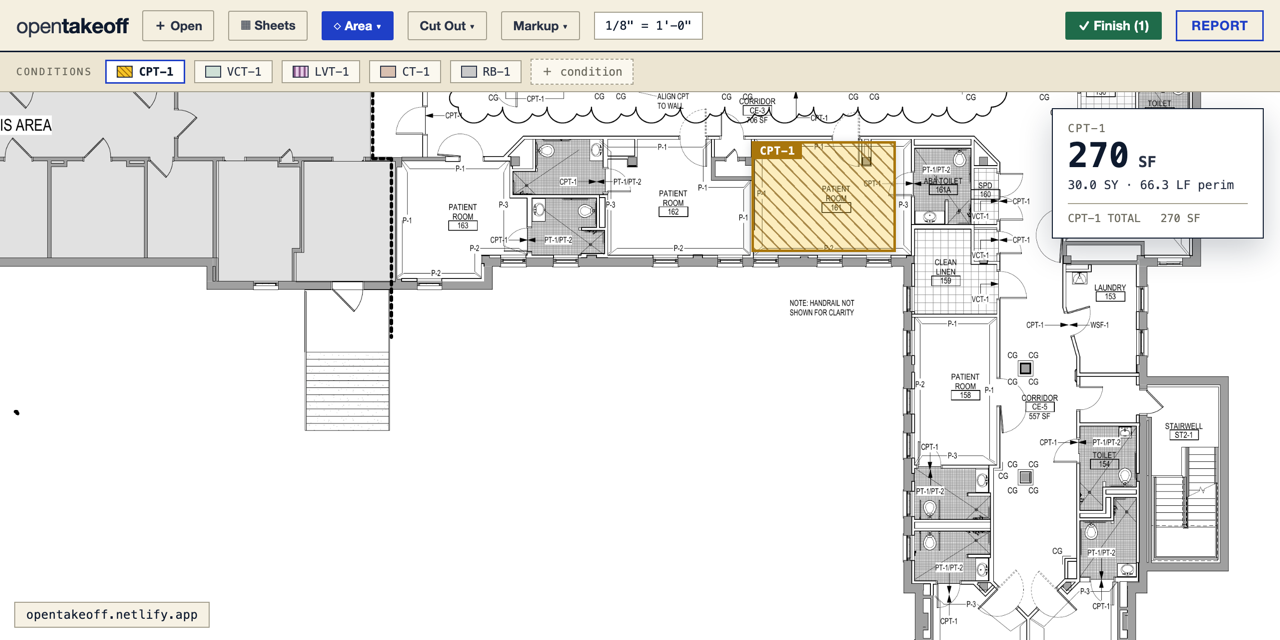
The tool works by opening a building plan (PDF, image, or .zip plan set), auto-detecting the drawn scale note or calibrating from a known dimension, and then measuring. The headline feature is One-Click Area: a user clicks inside a room and the linework bounds it, the polygon traces itself, and vertices snap to true corners. The engine reads the drawing the way an estimator does — hatching and poché patterns don't confuse it, and scanned plans work too using adaptive thresholding. For manual work, there are tools for area, rectangle, linear, surface-area (walls), count, and deduct, plus a drafting aid with 45°/90° angle lock that snaps walls square. The canvas stays razor-sharp on zoom because past a certain zoom level it re-renders from the PDF vectors rather than magnifying a fixed bitmap — a Bluebeam/AutoCAD-style effect — and users can switch to a dark view (true negative print, white linework on black) for night work.

Each measurement lives within a "condition" — one finish type like LVP, carpet, tile, or base. Conditions carry a line/fill color and CAD hatch pattern so the canvas looks like the real drawing, plus a per-condition waste %, a multiplier for repeated units, and a thickness that converts a linear run to square footage. The tool includes a materials layer most takeoff tools omit: per-condition labor type (glue-down, float, nail-down) and subfloor type (ply, concrete slab, OSB), plus consumables like adhesive, sealer, grout. Each material has a coverage rate and basis (floor square feet / linear feet / each), and order quantities are calculated automatically and rounded up. Reports break down totals per condition (Floor/Wall/Border square footage, linear feet, count, square yards, with and without waste) and generate a combined materials buy list. Export options include CSV, JSON, real Excel workbooks with multiple tabs, print, and Marked Set PDF — a distribution-ready file built entirely in the browser with sheets, burned-in work (colors, hatches, quantity chips), and a legend cover with totals.

In July 2026, OpenTakeoff added an MCP server (npx opentakeoff-mcp, registered on the official MCP registry at v0.2.0) that lets AI agents drive the measuring engine and browse the plan set natively — accessing sheets, title-block text, and rendered pages as MCP resources. Every shape records its provenance: the scale, whether it was one-click or hand-drawn, and whether a person or agent made it. This audit trail travels with the number. The tool also includes a Revisions feature to save the takeoff at each bid revision and compare quantity changes per condition, per sheet, and on the buy list, with a guarded restore so the live takeoff is never lost. A markup layer (revision clouds, callouts, text notes) sits separate from measured quantities, so markups never skew the totals.

All data stays local by default — PDFs and takeoffs live in the user's browser (IndexedDB and localStorage), no account is required, and there is no server. An optional team cloud mode for Google Workspace users adds shared projects in Google Drive, deep-linked material pricing, and local-first sync so annotations stay instant even on flaky networks, but this is off by default and the security posture remains a plain static site with no secrets in the bundle. The tool is free and open-source, hostable on Netlify, Vercel, GitHub Pages, S3, or any static host.

Context & Analysis

OpenTakeoff addresses a long-standing gap: there has been no open-source, web-based takeoff canvas available to the construction and flooring trades at all. The tool originated as the takeoff module of a private flooring estimating app, then was extracted, cleaned up, and released as a genuine alternative — including the One-Click Area flood-fill tracer that commercial tools charge $300/month to provide. The measuring engine itself is production-grade, not a simplified demo.

The July 2026 addition of the MCP server is the key innovation for AI adoption. Until now, AI agents could not measure a real building plan the way an estimator does; OpenTakeoff is the first place they can. Because the same engine runs for both people and agents, every measurement carries provenance — the scale, whether it was one-click or hand-drawn, and whether a person or agent made it. This audit trail travels with the number, which matters for construction bids and accountability.

The tool's architecture keeps data local by default: PDFs and takeoffs never leave your machine, stored in browser IndexedDB and localStorage. An optional team cloud mode via Google Drive is available, but it is strictly additive and off by default. This design preserves the security and ownership benefits of a static site for users who want them.

FAQ

How do I use OpenTakeoff — do I need to install anything?
No installation required. Open the live demo page, drag in a building plan PDF or image, and start measuring. All data stays in your browser; no account, no upload, no server needed.
How can an AI agent use it?
In July 2026, an MCP server was added (npx opentakeoff-mcp, on the official MCP registry at v0.2.0). An AI agent can call the same measuring tools over MCP — one-click room tracing, area calculation, and others — and browse the plan set natively (sheets, text, rendered pages).
What can I measure with it?
Area, linear distance, count, and deduct measurements work on any takeoff — flooring, drywall, paint, concrete, sitework. The tool includes finish-aware features for flooring (conditions with CAD hatches, waste %, square-yard output, and materials buy lists with coverage rates).

Get the latest Large Language Models news every morning

AI-summarized, only the topics you pick — one digest a day via Email, Slack, or Discord.

Free · takes 30 seconds · unsubscribe anytime

Discussion

No comments yet. Be the first to share your thoughts!

Log in to join the discussion

Related Articles

Stay ahead with AI news

Get curated AI news from 200+ sources delivered daily to your inbox. Free to use.

Get Started Free

Free · takes 30 seconds · unsubscribe anytime

1 minute a day. The AI essentials.

200+ sources · Email / LINE / Slack

Get it free →