What happened
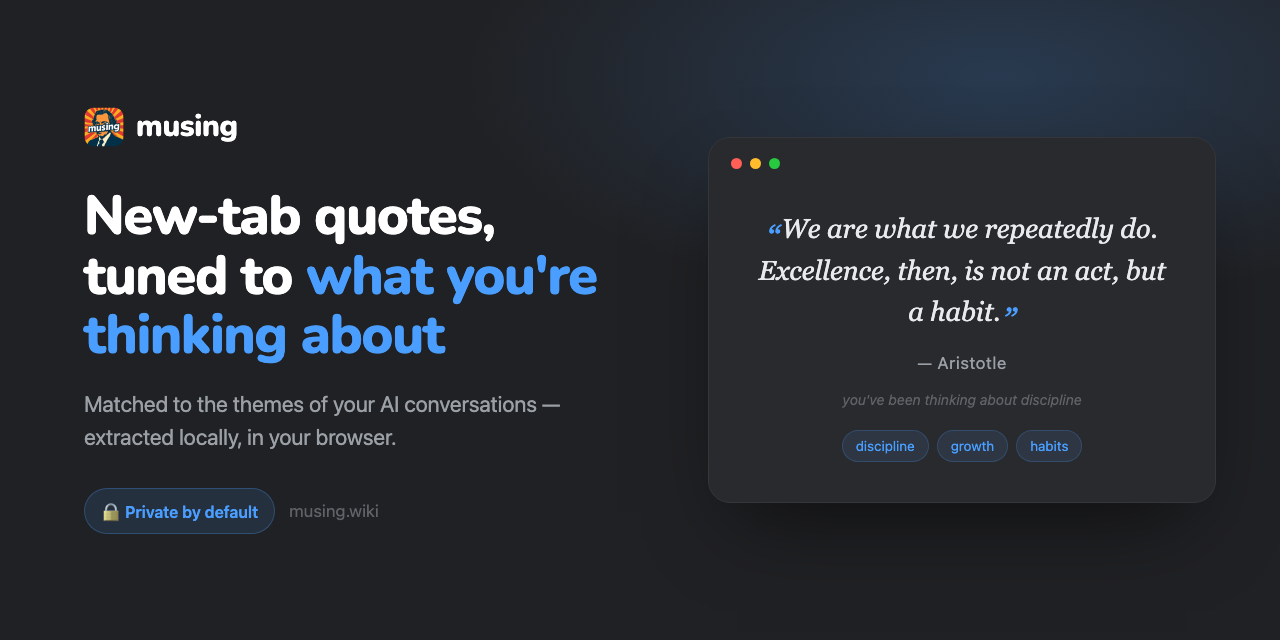
A Chrome extension called Musing transforms the new tab page to display quotes selected based on themes from your AI conversations (Claude, ChatGPT, Gemini). All analysis happens locally in your browser; no data is sent to external servers.
Why it matters
Privacy-conscious users often worry that personalization requires uploading their conversations. Musing demonstrates that theme-matching can work entirely on-device, letting you see contextually relevant quotes without trading data for convenience. The extension integrates with multiple popular AI assistants.
What to watch
The extension is available to add to Chrome. Users can optionally bring their own AI key to see explanations for why each quote was selected, or use it without that feature for purely local operation.
Summaries like this, in your inbox every morning.
Musing addresses a common tension in personalization: users want AI recommendations tailored to their interests, but many worry that personalization requires uploading private data to a company's servers. The extension splits the difference by keeping all conversation analysis on-device and deriving quote recommendations from themes extracted locally. This design choice appeals to privacy-conscious knowledge workers who spend time in AI chat interfaces and want their new tab to feel purposeful rather than generic.
The integration with multiple AI assistants (Claude, ChatGPT, Gemini) signals that Musing is not betting on a single platform. By working with "whatever you prefer," the extension positions itself as a neutral layer that respects how users already structure their workflow. The optional bring-your-own-key (BYOK) feature for explanations offers a middle ground: users can stay entirely local by default, or opt into light cloud assistance to understand the recommendation logic without storing their raw conversation history remotely.
For example, today's edition would include:
AI-summarized, only the topics you pick: one digest a day via Email, LINE, or Slack.
Free · 30 seconds with Google · unsubscribe anytimeWhat is AIToday? →
Ask AI anything about this article. The AI reads this article, earlier AIToday articles, and Wikipedia, and cites its sources. Q&As are published on this page for other readers too.
Engineer Rowan Howard-Jones said the scanning of UNCTADstat ran from April 13 to June 19, with agents using ur…

Meta's AI assistant Muse is drawing a strong market response
IDC released a report on 2026年9月23日 analyzing the "SaaSpocalypse" theory, concluding AI agents extend enterpri…

Nebius is raising on-demand rates on Oct

Google, OpenAI, and Anthropic are coordinating on their own "Standards Authority for Frontier AI," The Informa…

At the WeAreDevelopers World Congress North America in San Jose, Simon Willison said Claude Fable 5 was shut d…