What happened
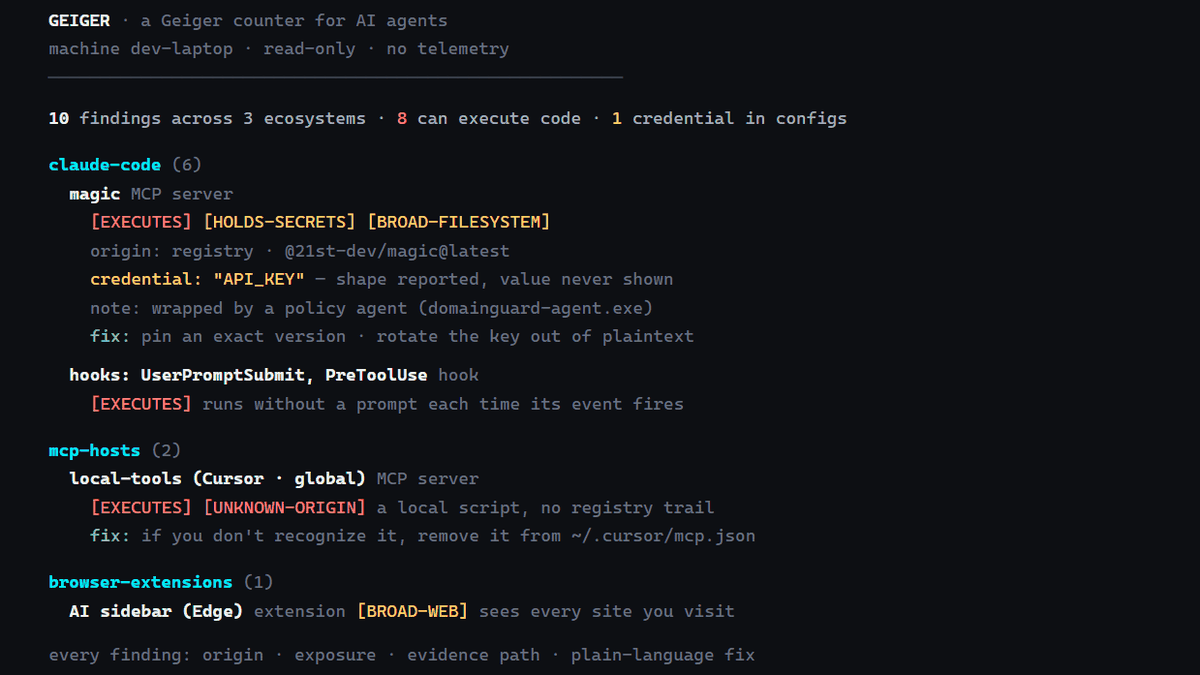
Atomburstofficial published Geiger, a free read-only command, npx geiger-scan, listing AI agents like Claude Code and Codex plus MCP servers, Hooks and AI extensions in Cursor or VS Code.
Why it matters
Anyone who has installed several AI agents and extensions may no longer know what is configured on their machine, and Geiger lays that out in one report, according to its Hacker News discussion.
Summaries like this, in your inbox every morning.
Geiger arrives as a small command-line tool aimed at a problem that builds up quietly: after trying one agent after another, old MCP servers, plugins and AI extensions stay on the machine, and their locations and settings become hard to track. According to the project's GitHub listing, one read-only command inventories every agent, MCP server, plugin and AI extension on a machine, and the scan output covers not only agents such as Claude Code and Codex but also MCP servers, Hooks and AI extensions registered in Cursor and VS Code.
Beyond the plain list, Geiger also assembles a report when the --html option is used, producing a self-contained HTML file that can be opened in a browser to check each item's access scope, config file and recommended action. For credential-like values found in config files, Geiger reports only the key name, the config file and the kind of credential, not the API key itself, so the report can be shared without exposing secrets.
It also supports comparison over time: --json saves the current state as baseline.json, and --diff compares that file with the current state to show what changed. On the social news site Hacker News, the tool drew mixed reactions — some saw it as useful for corporate use to grasp hidden AI inside an organization, while others argued that an environment where such a tool can count AI agent capabilities is not safe and that backups or sandboxes should be prepared.
Pick your industry and the AI tools you use, and get news related to your work every day.
Free · 30 seconds with Google · unsubscribe anytimeWhat is AIToday? →
Ask AI anything about this article. The AI reads this article, earlier AIToday articles, and Wikipedia, and cites its sources. Q&As are published on this page for other readers too.
AlphaProof Nexus cracked nine of 353 open Erdős problems, two unsolved for 56 years, and proved 44 conjectures…
CarWatch, built on a 2021 Mercedes-Benz E 300e plug-in hybrid called "@eclass", runs a local AI model on a Ras…
A columnist argues Microsoft's 4% drop from its 52-week high is a chance to buy more, pointing to Azure demand…

The Wall Street Journal reported that Amazon is negotiating to acquire US startup Decart AI in a deal that cou…

BotMan AI's Alejandro D’Andrea said its migration pipeline maps an app's dependencies, business logic and data…
Microsoft announced Microsoft-Decision-1 on October 9, a decision-focused model built on Alibaba's Qwen3.5-9B…