What happened
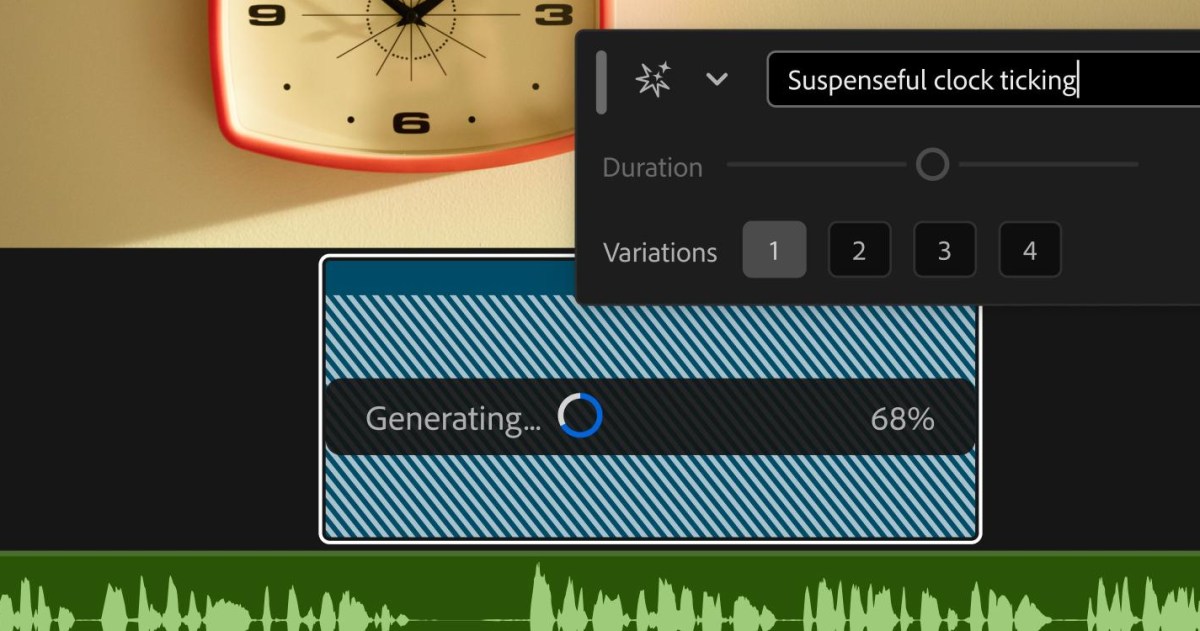
Adobe introduced Generative Media in Premiere, letting editors highlight an empty gap and generate context-aware, fully editable clips without leaving the timeline.
Why it matters
Editors previously had to jump between browsers or external apps to find missing B-roll or audio; now multiple AI models like Adobe Firefly and Google Veo are accessible in the timeline.
What to watch
The tool's effectiveness hinges on how well it integrates with editors' workflows. New AI audio tools and an AI Assistant for After Effects are in beta.
WHO IT HITSVideo editors using Premiere will save time by not switching between tools, but they must adapt to new AI-assisted workflows. Those who rely on traditional methods may need to learn new skills to stay efficient.
Summaries like this, every morning.
Pick your industry and the AI tools you use, and get news related to your work every day.
Free · 30 seconds with Google · unsubscribe anytimeWhat is AIToday? →
Ask AI anything about this article. The AI reads this article, earlier AIToday articles, and Wikipedia, and cites its sources. Q&As are published on this page for other readers too.
Google Cloud revenue grew 82% year over year to $24.8 billion last quarter, up from $13.6 billion a year earli…
Kazakhstan joined both camps — its AI minister Zhaslan Madiyev visited Washington in June, then Shanghai three…

South China Morning Post reported on October 25 that Hong Kong shoppers can scan a QR code, open an AI vending…

inori launched a free site that analyzes X posts to match users to an AI model like GPT, Claude or Gemini

The explainer lays out text guidance in three steps — CLIP or T5 encodes the prompt, cross-attention injects i…

Nvidia open-sourced Flora, a data engine of three fine-tuned Qwen3.5 models that covers all three label types…