What happened
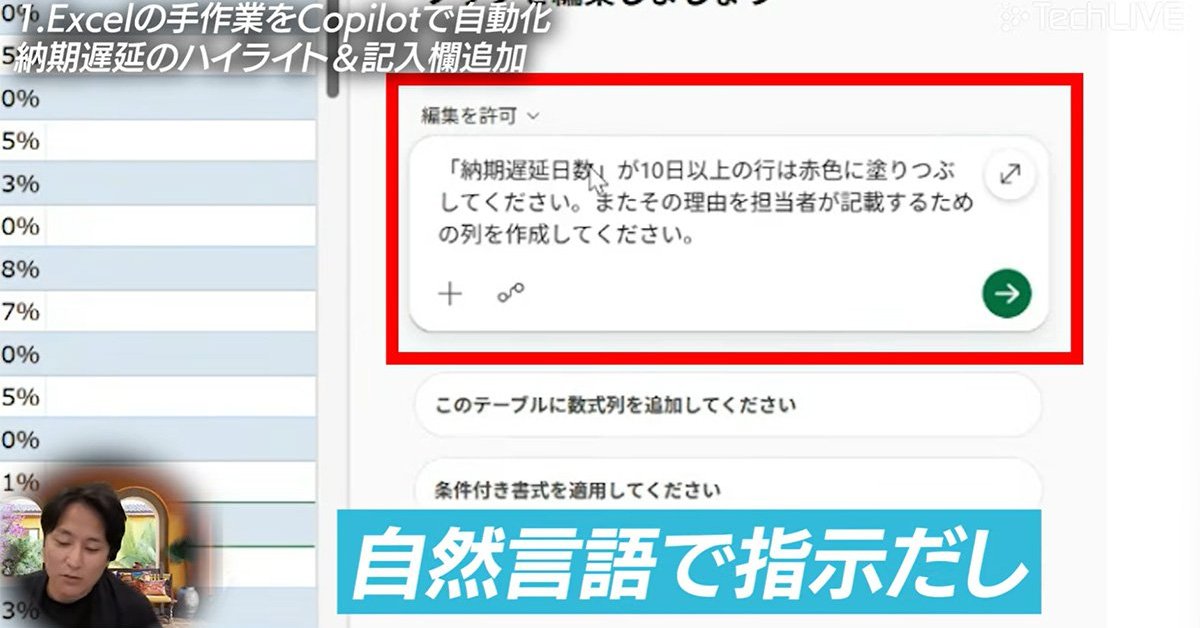
Microsoft MVP Kazuaki Asada set Microsoft 365 Copilot to "Allow edits" mode and asked it in plain language to fill rows delayed 10 days or more in red. Copilot did it correctly.
Why it matters
Work that used to require configuring conditional formatting rules or filtering cells by hand can now be done by describing the task. Copilot also matched a product master list by product name and flagged unmatched rows as errors.
What to watch
The hardest test — building a dashboard with pivot tables and charts — is shown only in ITmedia's TechLIVE video, so whether Copilot handles that reliably is not settled here.
WHO IT HITSBusiness teams that live in Excel — sales operations, reporting, and data-reconciliation staff — would need far less formula knowledge, since plain instructions replace manual conditional formatting and VLOOKUP/XLOOKUP entry.
Summaries like this, every morning.
Asada, who holds Microsoft's "Microsoft MVP" designation, built his demo around a made-up data set from an electric-vehicle maker's sales department. The sheet held salesperson names, product names, quantities sold and delivery-delay days — the kind of working file that many teams keep. Against that backdrop, the two tasks he chose are the ones that most often stall non-expert users: highlighting late orders, and matching one table to another.
In the first task, Copilot filled the delayed rows red after being told to mark rows delayed 10 days or more. That is work that previously meant setting conditional-formatting rules or filtering and recoloring cells by hand. In the second, it updated the unit-price column using product names as the key against a master list, and showed errors for names that could not be matched, as Asada had requested. These are the steps VLOOKUP and XLOOKUP normally require, with their lookup value, range, column number and match type.
The last demo — building a report with pivot tables and charts — is the one the article does not resolve, pointing instead to ITmedia's video channel. So the practical question for Excel-heavy teams is whether that multi-step work holds up the way the first two did; the small demo shown here suggests the simpler editing and matching tasks are already within reach.
Pick your industry and the AI tools you use, and get news related to your work every day.
Free · 30 seconds with Google · unsubscribe anytimeWhat is AIToday? →
Ask AI anything about this article. The AI reads this article, earlier AIToday articles, and Wikipedia, and cites its sources. Q&As are published on this page for other readers too.
CData's guide walks through creating a SELECT-only Snowflake role called claude_role, setting up an OAuth secu…

A Dell Technologies survey of 2,950 business and IT decision-makers in 35 countries found 58% of Japanese comp…
Oracle announced on Oct 28, 2026 an expanded partnership with OpenAI and a new product lineup spanning four ar…

Mercari's fiscal 2026 June-period earnings material shows all employees were using AI tools by the end of Janu…

Meta's personal AI agent Muse started in Japan on October 23, and unlike text generators it can operate websit…

Flamerix AI analyzed OpenTelemetry exports and found Claude Code's agent summary feature consumes roughly 15-2…