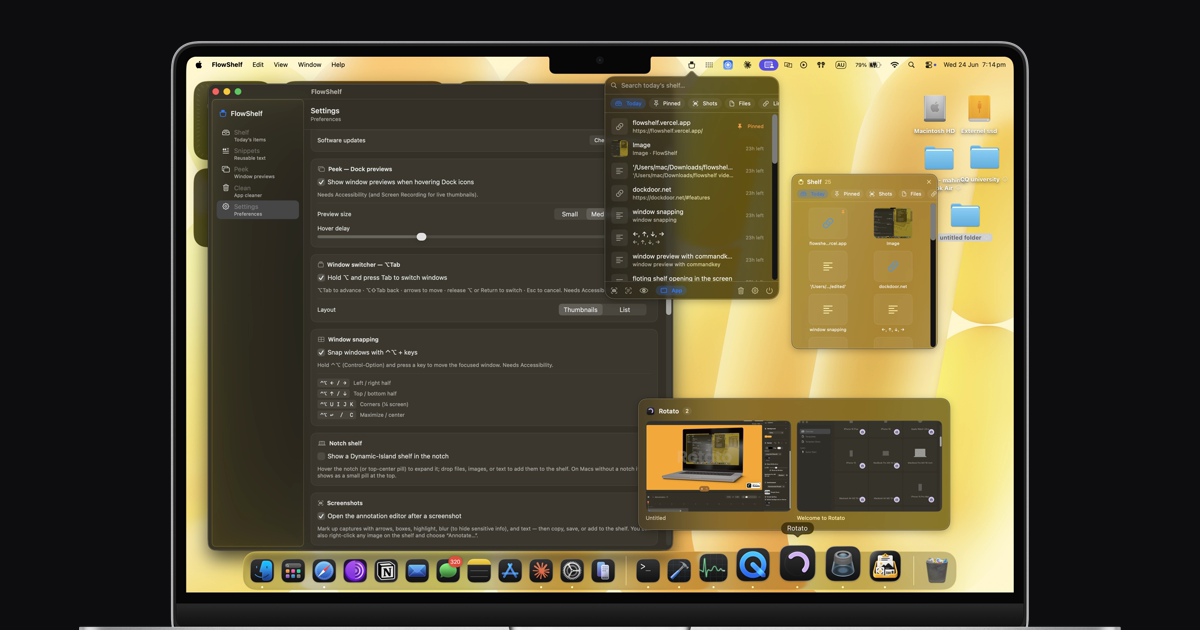
What happened
Mahin Kadery, a solo developer, released FlowShelf, a free menu-bar app for macOS that auto-captures clipboard items, summons a floating shelf at your cursor, turns screenshots into text via OCR, and previews windows — all running 100% on-device with no account or subscription required.
Why it matters
FlowShelf bundles features typically spread across five separate paid apps (Paste/Maccy at $29.99/yr, Magnet at $4.99, CleanShot X at $29, plus others) into a single free, source-available utility. It runs entirely on your Mac using Apple's on-device AI models, so your clipboard, screenshots, and files never leave your device — eliminating privacy concerns that come with cloud-based alternatives.
What to watch
The app is notarized by Apple, works on macOS 14+ (Sonoma or later) for both Apple Silicon and Intel Macs, and is ~7 MB in size. It auto-deletes shelf items after 24 hours to prevent clutter, and includes a private mode to pause clipboard capture when handling sensitive data. Source code is publicly available on GitHub for verification.
Ask the AI about this article →
Summaries like this, in your inbox every morning.
FlowShelf emerges from a common developer frustration: the fragmentation of Mac utilities. Mahin Kadery, a solo developer, consolidated five separate paid applications—clipboard managers (Paste/Maccy at $29.99/yr), window snappers (Magnet at $4.99), screenshot tools (CleanShot X at $29), and app uninstallers—into a single free offering. This consolidation strategy appeals to users tired of managing subscriptions and scattered preferences across multiple menu-bar apps.
The privacy model is central to FlowShelf's positioning. By running 100% on-device with no cloud servers or tracking, the app sidesteps the data-handling concerns that cloud-based clipboard and screenshot managers face. On-device AI features—powered by Apple's own models—add value without requiring user accounts or external API calls, a meaningful distinction in an era of increasing privacy scrutiny.
The open-source availability and Apple Developer ID notarization signal both transparency and legitimacy. Users can inspect the code themselves, and Apple's notarization means the app passes security checks and opens normally on macOS. These design choices position FlowShelf as trustworthy infrastructure rather than a consumer product dependent on corporate incentives.
For example, today's edition would include:
AI-summarized, only the topics you pick — one digest a day via Email, Slack, or Discord.
Free · 30 seconds with Google · unsubscribe anytimeWhat is AIToday? →
Ask AI anything about this article. Q&As are published on this page for other readers too.
Aron Inc. launched with $8 million raised across two rounds

Pedro Andrade, Talkdesk's VP of AI and generative AI business specialist, told theCUBE that CXA is "an operati…

In a Google DeepMind experiment, 100 Gemini 3.1 Pro agents were told to act as top math researchers and solve…

TechTouch surveyed 319 people overseeing generative AI at firms with over 1,000 employees
At a September 14 press briefing, China's Foreign Ministry deputy spokesperson Guo Jiakun responded to a Reute…

Microsoft joined OpenAI, Anthropic, and SpaceXAI on Monday in endorsing a more prudent approach to frontier AI…